<?xml version="1.0" encoding="utf-8"?><feed xmlns="http://www.w3.org/2005/Atom" xml:lang="en_US"><generator uri="https://jekyllrb.com/" version="4.4.1">Jekyll</generator><link href="https://azure.github.io/feed.xml" rel="self" type="application/atom+xml" /><link href="https://azure.github.io/" rel="alternate" type="text/html" hreflang="en_US" /><updated>2026-06-01T08:06:10+00:00</updated><id>https://azure.github.io/feed.xml</id><title type="html">Azure App Service</title><subtitle>Announcements, updates, and release notes from the Azure App Service product team.</subtitle><author><name>Azure App Service</name></author><entry><title type="html">Understand What’s Happening with Your App Service for Linux Website Using Site Status</title><link href="https://azure.github.io/2026/06/01/sitestatus.html" rel="alternate" type="text/html" title="Understand What’s Happening with Your App Service for Linux Website Using Site Status" /><published>2026-06-01T00:00:00+00:00</published><updated>2026-06-01T00:00:00+00:00</updated><id>https://azure.github.io/2026/06/01/sitestatus</id><content type="html" xml:base="https://azure.github.io/2026/06/01/sitestatus.html"><![CDATA[<p>When your website is not starting or behaving unexpectedly, it can be difficult to quickly understand what state the application is in and what might be causing the issue.</p>

<p>To make this easier, Azure App Service for Linux now includes <strong>Site Status</strong>. Site Status provides runtime information for your website, including the current state of the app and detailed error information when issues are detected.</p>

<h2 id="what-site-status-shows">What Site Status shows</h2>

<p>Site Status gives you a view into the current runtime state of your App Service for Linux website.</p>

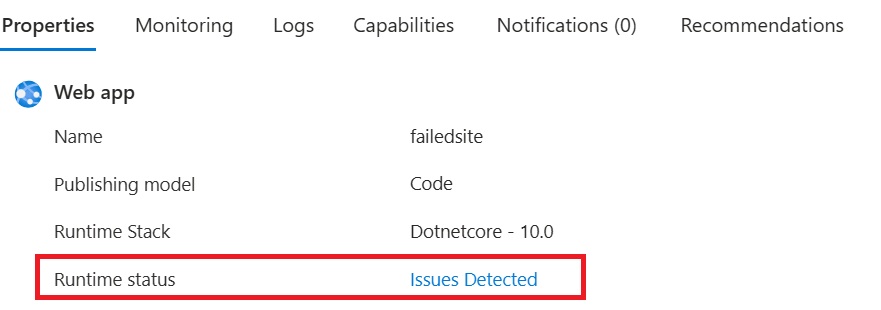
<p>You can see the site runtime status from the web app’s <strong>Properties</strong> experience. If the platform detects an issue with the site, the runtime status will show <strong>Issues Detected</strong>.</p>

<p><img src="/media/2026/06/sitestatus-1.jpg" alt="SiteStatus" /></p>

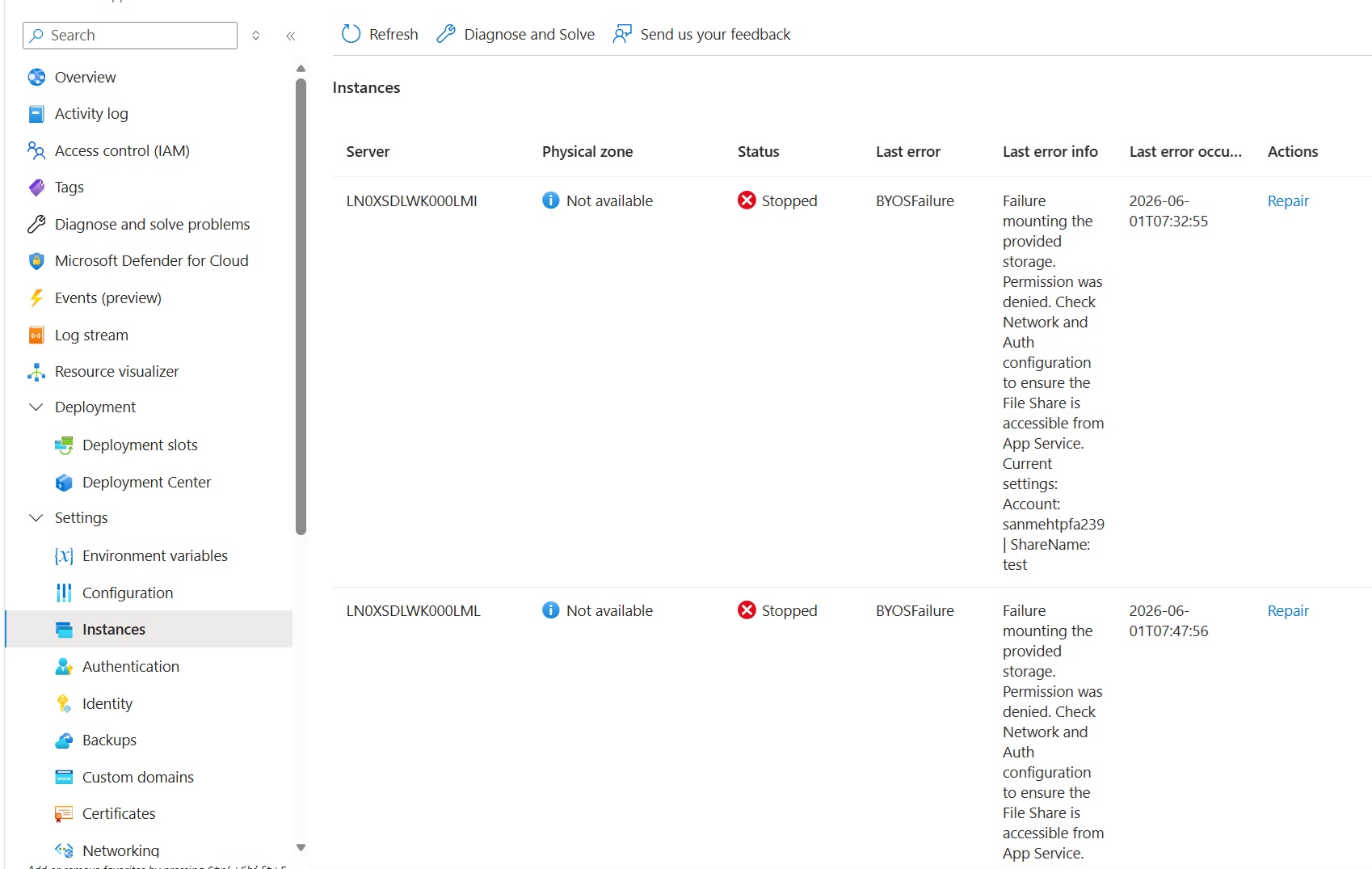
<p>Selecting <strong>Issues Detected</strong> opens a detailed view where you can see the current status of the site, the last known error, and additional troubleshooting details. If your app is scaled out across multiple instances, Site Status shows this information for each instance hosting your app.</p>

<p>This makes it easier to answer questions such as:</p>

<ul>
  <li>Is my website still starting?</li>
  <li>Did my website start successfully?</li>
  <li>Is the site stopped or blocked?</li>
  <li>Is the app recycling to apply changes?</li>
  <li>What was the last known runtime error?</li>
  <li>Is this likely a transient issue, or does the error point to a configuration problem?</li>
</ul>

<h2 id="site-status-values">Site Status values</h2>

<p>Site Status reports one of the following platform-defined runtime states for your website:</p>

<table>
  <thead>
    <tr>
      <th>Status</th>
      <th>Description</th>
    </tr>
  </thead>
  <tbody>
    <tr>
      <td><strong>Starting</strong></td>
      <td>The site is initializing the container and all necessary components.</td>
    </tr>
    <tr>
      <td><strong>Started</strong></td>
      <td>The site successfully initialized all necessary components and is running.</td>
    </tr>
    <tr>
      <td><strong>Stopping</strong></td>
      <td>The container and site components are being torn down.</td>
    </tr>
    <tr>
      <td><strong>Stopped</strong></td>
      <td>The site is no longer running and will not receive requests.</td>
    </tr>
    <tr>
      <td><strong>Updating</strong></td>
      <td>The site is recycling, either overlapped or non-overlapped, to apply the provided changes.</td>
    </tr>
    <tr>
      <td><strong>Blocked</strong></td>
      <td>The site attempted to start multiple times and is temporarily blocked from another attempt to reduce instance load.</td>
    </tr>
    <tr>
      <td><strong>Unknown</strong></td>
      <td>A platform-side issue is preventing status assessment.</td>
    </tr>
  </tbody>
</table>

<p>These statuses provide a quick summary of the current or last known runtime state of your website.</p>

<h2 id="view-detailed-issue-information">View detailed issue information</h2>

<p>When Site Status detects an issue, you can select <strong>Issues Detected</strong> to view more detailed runtime information.</p>

<p>The details page shows information such as:</p>

<table>
  <thead>
    <tr>
      <th>Field</th>
      <th>What it tells you</th>
    </tr>
  </thead>
  <tbody>
    <tr>
      <td><strong>Status</strong></td>
      <td>The current runtime state of the website.</td>
    </tr>
    <tr>
      <td><strong>Last error</strong></td>
      <td>A short error category or failure type.</td>
    </tr>
    <tr>
      <td><strong>Last error info</strong></td>
      <td>Additional troubleshooting details about the issue.</td>
    </tr>
    <tr>
      <td><strong>Last error occurrence</strong></td>
      <td>When the error was last observed.</td>
    </tr>
    <tr>
      <td><strong>Actions</strong></td>
      <td>Available repair actions.</td>
    </tr>
  </tbody>
</table>

<p><img src="/media/2026/06/sitestatus-2.jpg" alt="SiteStatus" /></p>

<p>For example, the screenshot above show a site that failed because the configured storage could not be mounted. The message points you toward the likely root cause. In this case, the issue is probably not with the site process itself. Restarting the app or replacing the instance may not resolve the problem. You would likely need to review the storage account, file share, firewall, networking, private endpoint, or authentication configuration.</p>

<h2 id="repair-actions">Repair actions</h2>

<p>From the issue details view, you can select <strong>Repair</strong> to take an action for the affected instance.</p>

<p>Available repair actions include:</p>

<table>
  <thead>
    <tr>
      <th>Action</th>
      <th>Description</th>
    </tr>
  </thead>
  <tbody>
    <tr>
      <td><strong>Restart</strong></td>
      <td>Restarts the site on the selected instance.</td>
    </tr>
    <tr>
      <td><strong>Replace instance</strong></td>
      <td>Moves the site away from the current instance and replaces it with another instance.</td>
    </tr>
  </tbody>
</table>

<p>These actions can be useful when your website has run into a transient runtime issue, or when the underlying instance is in a bad state.</p>

<p>However, repair actions are not a substitute for fixing configuration issues. For example, if the site cannot access a configured storage account because of network or authentication settings, restarting or replacing the instance is unlikely to fix the issue. The underlying configuration must be corrected first.</p>

<h2 id="site-status-vs-health-check">Site Status vs. Health Check</h2>

<p>Site Status and Health Check are both useful for understanding and improving the reliability of App Service for Linux websites, but they serve different purposes.</p>

<p><strong>Site Status</strong> helps you understand the current runtime state of your website. It provides platform-defined status values and detailed error information to help you troubleshoot startup, runtime, and configuration-related issues.</p>

<p><strong>Health Check</strong> helps determine whether an instance should continue receiving traffic. It pings a customer-configured endpoint and uses the HTTP response to identify unhealthy instances, redirect traffic, and replace instances when needed.</p>

<table>
  <thead>
    <tr>
      <th>Health Check</th>
      <th>Site Status</th>
    </tr>
  </thead>
  <tbody>
    <tr>
      <td>Pings a customer-configured endpoint.</td>
      <td>Uses platform-side runtime checks.</td>
    </tr>
    <tr>
      <td>Reports the HTTP status returned by your configured endpoint.</td>
      <td>Reports a platform-defined runtime status for the site.</td>
    </tr>
    <tr>
      <td>Helps determine whether an instance should receive traffic.</td>
      <td>Helps explain what is happening with the website at runtime.</td>
    </tr>
    <tr>
      <td>Requires a health check path to be configured.</td>
      <td>Does not require a customer-configured health endpoint.</td>
    </tr>
  </tbody>
</table>

<h2 id="summary">Summary</h2>

<p>Site Status gives you a clearer view into the runtime state of your App Service for Linux website. By surfacing platform-defined site status values and detailed runtime information, it helps you understand what is happening with your application as it starts, runs, updates, or stops.</p>

<p>We are continuously improving App Service for Linux to provide better visibility, more actionable information, and a smoother experience for running your applications in Azure.</p>]]></content><author><name>Azure App Service</name></author><summary type="html"><![CDATA[When your website is not starting or behaving unexpectedly, it can be difficult to quickly understand what state the application is in and what might be causing the issue.]]></summary></entry><entry><title type="html">Platform Improvements for Python AI Apps on Azure App Service</title><link href="https://azure.github.io/2026/05/18/platform-improvements-for-python-ai-apps-on-azure-app-service.html" rel="alternate" type="text/html" title="Platform Improvements for Python AI Apps on Azure App Service" /><published>2026-05-18T00:00:00+00:00</published><updated>2026-05-18T00:00:00+00:00</updated><id>https://azure.github.io/2026/05/18/platform-improvements-for-python-ai-apps-on-azure-app-service</id><content type="html" xml:base="https://azure.github.io/2026/05/18/platform-improvements-for-python-ai-apps-on-azure-app-service.html"><![CDATA[<p>Originally published on <a href="https://techcommunity.microsoft.com/blog/AppsonAzureBlog/platform-improvements-for-python-ai-apps-on-azure-app-service/4519620">Microsoft Tech Community</a>.</p>

<p>Azure App Service on Linux is a fully managed platform for web and API applications across Python, Node.js, .NET, PHP, Java, and other stacks. Developers can deploy source code or a pre-built artifact, and App Service handles dependency installation, containerization, and running the application at cloud scale.</p>

<p>As more customers build intelligent applications with Azure AI Foundry and other AI services, Python has become one of the most important languages for these workloads. The performance and reliability of the Python deployment pipeline directly affect the developer experience on App Service, so we looked across the deployment path for opportunities to reduce latency and improve reliability.</p>

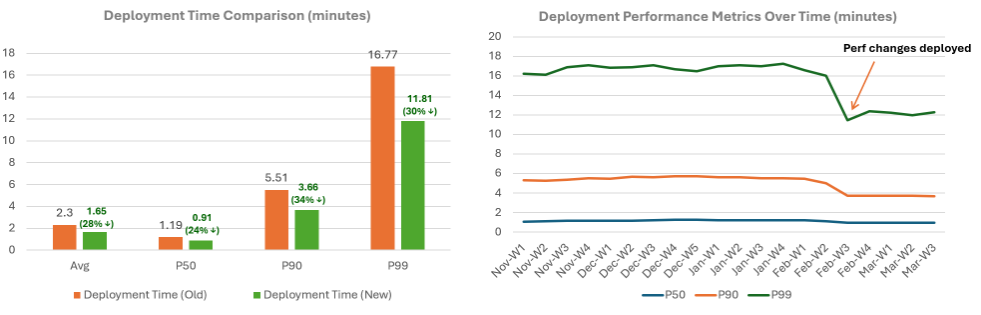
<p>The first set of changes has reduced Python deployment latency on Azure App Service on Linux by approximately 30%. This is the first step in a broader effort to make the platform better suited for AI application development, and the same improvements benefit many other Python apps on the platform.</p>

<h2 id="where-deployment-time-was-going">Where deployment time was going</h2>

<p>Python web application deployments on Azure App Service on Linux rely on <a href="https://github.com/microsoft/Oryx">Oryx</a>, the platform’s open-source build system, to produce runnable artifacts during remote builds. Platform telemetry showed that about 70% of Python app deployments use remote builds, and most of those deployments resolve dependencies from <code class="language-plaintext highlighter-rouge">requirements.txt</code> by using <code class="language-plaintext highlighter-rouge">pip install</code>.</p>

<p>To understand where time was going, we profiled a stress workload: a 7.5 GB PyTorch application. Most production builds are smaller, but stress testing a dependency-heavy application made the pipeline bottlenecks clear.</p>

<p>When a Python app is deployed through remote build, the Kudu build container runs Oryx to:</p>

<ol>
  <li>Extract the uploaded source code.</li>
  <li>Create a Python virtual environment.</li>
  <li>Install dependencies with <code class="language-plaintext highlighter-rouge">pip install</code>; 4.35 minutes, or about 34% of build time.</li>
  <li>Copy files to a staging directory; 0.98 minutes, or about 8% of build time.</li>
  <li>Compress the output with <code class="language-plaintext highlighter-rouge">tar</code> and <code class="language-plaintext highlighter-rouge">gzip</code> into an archive; 7.53 minutes, or about 58% of build time.</li>
  <li>Write the archive to <code class="language-plaintext highlighter-rouge">/home</code>, which is backed by an Azure Storage SMB mount.</li>
</ol>

<p>The app container then extracts this archive to local disk on every cold start.</p>

<h2 id="why-the-archive-based-approach">Why the archive-based approach?</h2>

<p>The <code class="language-plaintext highlighter-rouge">/home</code> directory is backed by an Azure Storage SMB mount, where small-file I/O is comparatively expensive. Python dependencies are file-heavy. Virtual environments commonly contain tens of thousands of files, and dependency-heavy machine learning applications can exceed 200,000 files.</p>

<p>Writing those files individually over SMB would be prohibitively slow. Instead, the pipeline builds on the container’s local filesystem, writes a single compressed archive over SMB, and lets the app container extract it locally on startup for efficient module loading.</p>

<p>The key insight from profiling was that compression was the single largest phase at 58% of build time, taking longer than installing the packages themselves.</p>

<h2 id="what-changed">What changed</h2>

<h3 id="zstandard-compression-replacing-gzip">Zstandard compression replacing gzip</h3>

<p>Standard <code class="language-plaintext highlighter-rouge">gzip</code> compression is single-threaded. In our benchmark, compression accounted for 58% of total build time, making it the dominant bottleneck. Because the archive is also decompressed during container startup, decompression time affects runtime startup latency as well.</p>

<p>We evaluated three compression algorithms: <code class="language-plaintext highlighter-rouge">gzip</code>, LZ4, and Zstandard (<code class="language-plaintext highlighter-rouge">zstd</code>). These results are averaged across multiple deployments of a 7.5 GB Python application with PyTorch and additional machine learning packages.</p>

<table>
  <thead>
    <tr>
      <th>Metric</th>
      <th style="text-align: right">gzip</th>
      <th style="text-align: right">LZ4</th>
      <th style="text-align: right">zstd</th>
    </tr>
  </thead>
  <tbody>
    <tr>
      <td>Compression time</td>
      <td style="text-align: right">7.53 min</td>
      <td style="text-align: right">1.20 min</td>
      <td style="text-align: right">1.18 min</td>
    </tr>
    <tr>
      <td>Decompression time</td>
      <td style="text-align: right">2.80 min</td>
      <td style="text-align: right">1.18 min</td>
      <td style="text-align: right">1.07 min</td>
    </tr>
    <tr>
      <td>Archive size</td>
      <td style="text-align: right">4.0 GB</td>
      <td style="text-align: right">5.0 GB</td>
      <td style="text-align: right">4.8 GB</td>
    </tr>
  </tbody>
</table>

<p>Both <code class="language-plaintext highlighter-rouge">zstd</code> and LZ4 were more than 6x faster than <code class="language-plaintext highlighter-rouge">gzip</code> for compression and more than 2x faster for decompression. We selected <code class="language-plaintext highlighter-rouge">zstd</code> because it provides speed comparable to LZ4 with a smaller archive size, is based on <a href="https://datatracker.ietf.org/doc/html/rfc8878">RFC 8878</a>, ships with many common Linux distributions, and works natively with <code class="language-plaintext highlighter-rouge">tar -I zstd</code> without extra packages.</p>

<p>Result: compression time dropped from 7.53 minutes to 1.18 minutes, a 6.4x improvement. Decompression improved from 2.80 minutes to 1.07 minutes, a 2.6x improvement that directly reduces cold-start latency.</p>

<h3 id="faster-package-installation-with-uv">Faster package installation with uv</h3>

<p><code class="language-plaintext highlighter-rouge">pip</code> is implemented in Python and has historically optimized compatibility over maximum parallelism. In dependency-heavy workloads, package download, resolution, and installation can become a major part of deployment time. In the 7.5 GB PyTorch benchmark, package installation accounted for about 34% of total build time: 4.35 minutes out of 12.86 minutes.</p>

<p>We introduced <a href="https://github.com/astral-sh/uv">uv</a>, a Python package manager written in Rust, as the primary installer for compatible <code class="language-plaintext highlighter-rouge">requirements.txt</code> deployments. Its <code class="language-plaintext highlighter-rouge">uv pip install</code> interface works with standard <code class="language-plaintext highlighter-rouge">pip</code> workflows.</p>

<p>Compatibility remains the priority. When <code class="language-plaintext highlighter-rouge">uv</code> cannot handle a deployment, the platform retries with <code class="language-plaintext highlighter-rouge">pip</code>, preserving the behavior customers already depend on.</p>

<p>Package caches remain local to the build container. When the same app is deployed again before the Kudu build container is recycled, both <code class="language-plaintext highlighter-rouge">pip</code> and <code class="language-plaintext highlighter-rouge">uv</code> can reuse cached packages and avoid repeated downloads.</p>

<p>Result: package installation time dropped from 4.35 minutes to 1.50 minutes, a 3x improvement.</p>

<h3 id="reducing-file-copy-overhead">Reducing file copy overhead</h3>

<p>File copy overhead appeared in two places. First, before compression, the build process copied the entire build directory, including application code and Python packages, to a staging location. This existed historically as a safety measure to create a clean snapshot before <code class="language-plaintext highlighter-rouge">tar</code> reads the file tree, but the cost was high for the large number of files common in Python dependencies.</p>

<p>The fix was straightforward: create the <code class="language-plaintext highlighter-rouge">tar</code> archive directly from the build directory and skip the intermediate copy.</p>

<p>Second, for pre-built deployment scenarios, we replaced the legacy Kudu sync path with Linux-native <code class="language-plaintext highlighter-rouge">rsync</code>. This gives us a better optimized tool for large Linux file trees and reduces the overhead of moving files into the final deployment location. Because this path is used beyond Python, the improvement benefits pre-built apps across the broader App Service on Linux ecosystem.</p>

<p>Result: the 0.98-minute staging copy, or 8% of build time, was eliminated. This also reduced temporary disk usage and improved the remaining file sync path.</p>

<h3 id="pre-built-python-wheels-cache">Pre-built Python wheels cache</h3>

<p>We added a complementary optimization: a read-only cache of pre-built wheels for commonly used Python packages, selected using platform telemetry. The cache is mounted into the Kudu build container at runtime for Python workloads, allowing the installer to use local wheel artifacts before downloading packages externally.</p>

<p>When a matching wheel is available, the installer uses it directly and avoids a network fetch for that package. Cache misses fall back to the upstream registry, such as PyPI, as usual.</p>

<p>The cache is managed by the platform and kept up to date, so supported Python builds can use it without any app changes.</p>

<h2 id="combined-results">Combined results</h2>

<p><img src="/media/2026/05/python-ai-app-service-improvements.png" alt="Deployment time comparison and deployment performance metrics over time" /></p>

<h3 id="controlled-benchmark-pytorch-75-gb-on-p1mv3">Controlled benchmark: PyTorch 7.5 GB on P1mv3</h3>

<p>The following benchmark was measured on the P1mv3 App Service tier. Values in the “After” column reflect the optimized pipeline with <code class="language-plaintext highlighter-rouge">zstd</code> compression, <code class="language-plaintext highlighter-rouge">uv</code> package installation, direct tar creation, and the pre-built wheels cache enabled together.</p>

<table>
  <thead>
    <tr>
      <th>Phase</th>
      <th style="text-align: right">Before</th>
      <th style="text-align: right">After</th>
      <th style="text-align: right">Improvement</th>
    </tr>
  </thead>
  <tbody>
    <tr>
      <td>Package installation</td>
      <td style="text-align: right">4.35 min</td>
      <td style="text-align: right">1.50 min</td>
      <td style="text-align: right">~3x faster</td>
    </tr>
    <tr>
      <td>File copy</td>
      <td style="text-align: right">0.98 min</td>
      <td style="text-align: right">0 min</td>
      <td style="text-align: right">Eliminated</td>
    </tr>
    <tr>
      <td>Compression</td>
      <td style="text-align: right">7.53 min</td>
      <td style="text-align: right">1.18 min</td>
      <td style="text-align: right">~6x faster</td>
    </tr>
    <tr>
      <td>Total build time</td>
      <td style="text-align: right">12.86 min</td>
      <td style="text-align: right">~2.68 min</td>
      <td style="text-align: right">~79% reduction</td>
    </tr>
  </tbody>
</table>

<h3 id="production-fleet-all-python-linux-web-apps">Production fleet: all Python Linux web apps</h3>

<p>Production telemetry across Python deployments shows the impact of these changes: deployment latency decreased by approximately 30% after rollout.</p>

<p>The controlled benchmark shows a larger improvement, about 79%, because it exercises a dependency-heavy workload where package installation, file copy, and compression dominate total build time. Typical production apps are smaller and spend less time proportionally in those phases.</p>

<h2 id="beyond-faster-builds-reliability-and-runtime-performance">Beyond faster builds: reliability and runtime performance</h2>

<p>Faster builds only help when deployment requests reliably reach a worker that is ready to build. We updated the primary deployment clients, including Azure CLI, GitHub Actions, and Azure DevOps Pipelines, to warm up Kudu before initiating deployments. Clients now issue a lightweight health-check request to the Kudu endpoint, helping ensure the deployment container is running and ready before the deployment begins.</p>

<p>Clients also preserve affinity to the warmed-up worker by using the ARR affinity cookie returned by the first request. This increases the chance that the deployment uses a worker where Kudu is already running and local package caches are already available from recent deployments.</p>

<p>Together, these client-side changes reduced deployment failures from transient infrastructure issues and helped the pipeline optimizations reach the build phase reliably.</p>

<p>Result: deployment failures caused by cold-start errors such as 502, 503, and 499 dropped by approximately 30%.</p>

<p>We also improved the default runtime configuration for Python apps using the platform-provided Gunicorn startup path. Previously, the platform defaulted to a single worker, leaving most CPU cores idle. Now, it follows Gunicorn’s recommended worker formula, fully using available cores on multi-core SKUs and delivering higher request throughput out of the box.</p>

<div class="language-text highlighter-rouge"><div class="highlight"><pre class="highlight"><code>workers = (2 * NUM_CORES) + 1
</code></pre></div></div>

<h2 id="key-takeaways">Key takeaways</h2>

<ul>
  <li>Measure before optimizing. Platform telemetry showed that remote builds and <code class="language-plaintext highlighter-rouge">requirements.txt</code>-based installs were the dominant Python deployment paths, helping us focus on changes that benefit the most customers.</li>
  <li>Compression was the biggest bottleneck. In the dependency-heavy benchmark, archive compression took longer than package installation. Replacing <code class="language-plaintext highlighter-rouge">gzip</code> with <code class="language-plaintext highlighter-rouge">zstd</code> reduced build time and cold-start extraction time.</li>
  <li>File count matters. Python virtual environments can contain tens of thousands of files, and AI workloads can contain many more. Reducing unnecessary file copies and using Linux-native file sync helped lower overhead.</li>
  <li>Compatibility needs a fallback path. Introducing <code class="language-plaintext highlighter-rouge">uv</code> improved the common path, while falling back to <code class="language-plaintext highlighter-rouge">pip</code> preserved compatibility for apps that depend on existing Python packaging behavior.</li>
  <li>Deployment reliability is part of performance. Faster builds only help if deployment requests consistently reach a ready worker. Warm-up and worker affinity made the optimized path more reliable for customers.</li>
  <li>Runtime defaults matter too. Settings such as Gunicorn worker configuration affect how production apps perform after deployment is complete.</li>
</ul>

<p>Together, these changes make Python deployments faster and more reliable while preserving compatibility through safe fallbacks. We will continue improving the platform to make Azure App Service faster, more reliable, and better suited for AI application development.</p>]]></content><author><name>Azure App Service</name></author><summary type="html"><![CDATA[Originally published on Microsoft Tech Community.]]></summary></entry><entry><title type="html">Simplifying FastAPI Deployments on Azure App Service for Linux</title><link href="https://azure.github.io/2026/05/14/fastapi-improvements.html" rel="alternate" type="text/html" title="Simplifying FastAPI Deployments on Azure App Service for Linux" /><published>2026-05-14T00:00:00+00:00</published><updated>2026-05-14T00:00:00+00:00</updated><id>https://azure.github.io/2026/05/14/fastapi-improvements</id><content type="html" xml:base="https://azure.github.io/2026/05/14/fastapi-improvements.html"><![CDATA[<p>Deploying FastAPI apps to Azure App Service for Linux is now simpler.</p>

<p>Previously, when you deployed a FastAPI application, you needed to configure a custom startup command so the app could run correctly with an ASGI server. This added an extra step to the deployment flow and could create friction, especially when getting started with FastAPI on App Service.</p>

<p>We have now added built-in detection logic that identifies FastAPI applications automatically and configures the appropriate startup behavior for you.</p>

<h2 id="what-changed">What changed</h2>

<p>When you deploy a Python app, App Service now scans common entry point files such as:</p>

<p><code class="language-plaintext highlighter-rouge">main.py</code>, <code class="language-plaintext highlighter-rouge">app.py</code>, <code class="language-plaintext highlighter-rouge">application.py</code>, <code class="language-plaintext highlighter-rouge">server.py</code>, <code class="language-plaintext highlighter-rouge">asgi.py</code>, <code class="language-plaintext highlighter-rouge">api.py</code>, <code class="language-plaintext highlighter-rouge">index.py</code>, and <code class="language-plaintext highlighter-rouge">run.py</code></p>

<p>If one of these files imports FastAPI using <code class="language-plaintext highlighter-rouge">from fastapi</code> or <code class="language-plaintext highlighter-rouge">import fastapi</code>, App Service detects the app as a FastAPI application.</p>

<p>To avoid false positives, files that also import Flask are skipped during FastAPI detection.</p>

<h2 id="how-your-app-is-started">How your app is started</h2>

<p>When a FastAPI app is detected, App Service automatically starts the application using Gunicorn with the Uvicorn worker class:</p>

<div class="language-bash highlighter-rouge"><div class="highlight"><pre class="highlight"><code>gunicorn <span class="nt">-k</span> uvicorn_worker.UvicornWorker
</code></pre></div></div>

<p>This provides the ASGI support required by FastAPI applications.</p>

<h2 id="framework-detection-priority">Framework detection priority</h2>

<p>If multiple framework indicators are present, App Service uses the following priority order:</p>

<div class="language-text highlighter-rouge"><div class="highlight"><pre class="highlight"><code>Django &gt; FastAPI &gt; Flask
</code></pre></div></div>

<p>Django continues to take precedence when a <code class="language-plaintext highlighter-rouge">wsgi.py</code> file is found in a subdirectory.</p>

<h2 id="what-this-means-for-you">What this means for you</h2>

<p>When you deploy a FastAPI app to Azure App Service for Linux, you no longer need to configure a custom startup command in the supported runtime flow. Oryx detects the FastAPI app and configures the startup behavior automatically.</p>

<p>This removes an extra setup step and makes it easier to get your FastAPI app running on App Service.</p>

<h2 id="availability">Availability</h2>

<p>This improvement is currently enabled for Python 3.14 and later. Support for additional Python versions will be enabled in an upcoming rollout.</p>

<p>For more details on deploying Python apps to App Service, see the Azure App Service <a href="https://learn.microsoft.com/azure/app-service/quickstart-python">Python quickstart documentation</a>.</p>]]></content><author><name>Azure App Service</name></author><summary type="html"><![CDATA[Deploying FastAPI apps to Azure App Service for Linux is now simpler.]]></summary></entry><entry><title type="html">Improving Deployment Resiliency on Azure App Service for Linux with Deferred Kudu Recycle</title><link href="https://azure.github.io/2026/05/07/kudu-deferred-recycle.html" rel="alternate" type="text/html" title="Improving Deployment Resiliency on Azure App Service for Linux with Deferred Kudu Recycle" /><published>2026-05-07T00:00:00+00:00</published><updated>2026-05-07T00:00:00+00:00</updated><id>https://azure.github.io/2026/05/07/kudu-deferred-recycle</id><content type="html" xml:base="https://azure.github.io/2026/05/07/kudu-deferred-recycle.html"><![CDATA[<p>Azure App Service for Linux now includes <strong>Deferred Kudu Recycle</strong>, a platform improvement designed to make deployments more resilient when app settings or connection strings are updated during an active deployment.</p>

<p>Previously, changing app settings or connection strings could trigger an immediate recycle of Kudu or SCM site. If an asynchronous deployment was already running, this could interrupt the deployment and lead to failures or retries.</p>

<p>With Deferred Kudu Recycle, App Service now reduces unnecessary interruptions while still ensuring deployment-critical changes take effect when they are needed.</p>

<h2 id="how-it-works">How it works</h2>

<p>On Linux App Service, Kudu powers deployment workflows such as ZIP deploy, Git-based deployments, and Oryx-based builds. When app settings or connection strings change, Kudu needs to recycle so the updated environment is available.</p>

<p>With Deferred Kudu Recycle:</p>

<ul>
  <li>If the setting change is <strong>not deployment-critical</strong>, the Kudu recycle is deferred until the in-progress asynchronous deployment completes.</li>
  <li>If the setting change <strong>is deployment-critical</strong>, Kudu recycles immediately so the deployment pipeline uses the correct configuration.</li>
  <li>New deployments started after the setting change always use the updated environment.</li>
  <li>Synchronous deployments are not affected by this behavior.</li>
</ul>

<p>The deferral window is up to <strong>40 minutes</strong>. If the deployment does not complete within that window, the recycle proceeds and the deployment may be interrupted.</p>

<h2 id="what-counts-as-deployment-critical">What counts as deployment-critical?</h2>

<p>Some settings directly affect how App Service builds or deploys your application. Changes to these settings continue to trigger an immediate Kudu recycle.</p>

<p>Examples include settings and prefixes such as:</p>

<table>
  <thead>
    <tr>
      <th>Setting or prefix</th>
      <th>Example</th>
    </tr>
  </thead>
  <tbody>
    <tr>
      <td><code class="language-plaintext highlighter-rouge">KUDU_*</code></td>
      <td><code class="language-plaintext highlighter-rouge">KUDU_SYNC_CMD</code></td>
    </tr>
    <tr>
      <td><code class="language-plaintext highlighter-rouge">ORYX_*</code></td>
      <td><code class="language-plaintext highlighter-rouge">ORYX_BUILD_FLAGS</code></td>
    </tr>
    <tr>
      <td><code class="language-plaintext highlighter-rouge">ENABLE_ORYX_BUILD</code></td>
      <td> </td>
    </tr>
    <tr>
      <td><code class="language-plaintext highlighter-rouge">PRE_BUILD_*</code></td>
      <td><code class="language-plaintext highlighter-rouge">PRE_BUILD_COMMAND</code></td>
    </tr>
    <tr>
      <td><code class="language-plaintext highlighter-rouge">POST_BUILD_*</code></td>
      <td><code class="language-plaintext highlighter-rouge">POST_BUILD_COMMAND</code></td>
    </tr>
    <tr>
      <td><code class="language-plaintext highlighter-rouge">SCM_*</code></td>
      <td><code class="language-plaintext highlighter-rouge">SCM_DO_BUILD_DURING_DEPLOYMENT</code></td>
    </tr>
    <tr>
      <td><code class="language-plaintext highlighter-rouge">WEBSITE_SCM_*</code></td>
      <td> </td>
    </tr>
    <tr>
      <td><code class="language-plaintext highlighter-rouge">WEBSITE_RUN_FROM_PACKAGE</code></td>
      <td> </td>
    </tr>
    <tr>
      <td><code class="language-plaintext highlighter-rouge">WEBSITE_SWAP_SLOTNAME</code></td>
      <td> </td>
    </tr>
    <tr>
      <td><code class="language-plaintext highlighter-rouge">WEBSITE_ELASTIC_SCALING_ENABLED</code></td>
      <td> </td>
    </tr>
    <tr>
      <td><code class="language-plaintext highlighter-rouge">MSBUILD_CONFIGURATION</code></td>
      <td> </td>
    </tr>
  </tbody>
</table>

<p>For these settings, an immediate recycle helps ensure the deployment pipeline runs with the correct configuration.</p>

<h2 id="custom-deployment-critical-settings">Custom deployment-critical settings</h2>

<p>Most customers do not need to configure anything. The default list covers common Kudu and Oryx deployment settings.</p>

<p>However, if your build or deployment process depends on custom app settings, you can mark them as deployment-critical by using the following app setting:</p>

<div class="language-text highlighter-rouge"><div class="highlight"><pre class="highlight"><code>WEBSITE_DEPLOYMENT_CRITICAL_APPSETTINGS
</code></pre></div></div>

<p>The value should be a semicolon-separated list of setting names or prefixes.</p>

<p>Example:</p>

<div class="language-text highlighter-rouge"><div class="highlight"><pre class="highlight"><code>WEBSITE_DEPLOYMENT_CRITICAL_APPSETTINGS=NODE_VERSION;MY_BUILD_FLAG
</code></pre></div></div>

<p>After this is configured, changes to <code class="language-plaintext highlighter-rouge">NODE_VERSION</code> or <code class="language-plaintext highlighter-rouge">MY_BUILD_FLAG</code> will trigger an immediate Kudu recycle instead of being deferred.</p>

<p>Only add settings that your build or deployment process genuinely depends on. Adding unnecessary entries can increase the chance of interrupting an in-progress asynchronous deployment.</p>

<h2 id="what-this-means-for-you">What this means for you</h2>

<p>Deferred Kudu Recycle improves deployment resiliency by reducing interruptions caused by unrelated configuration changes.</p>

<p>For example, changing a non-critical setting such as an Application Insights instrumentation key or a custom runtime setting that does not affect the build process will no longer interrupt an asynchronous deployment that is already in progress.</p>

<p>At the same time, App Service continues to recycle Kudu immediately when deployment-critical settings change, ensuring build and deployment workflows use the right configuration.</p>

<h2 id="no-action-required-for-most-apps">No action required for most apps</h2>

<p>This improvement is enabled by the platform. For most applications, no changes are required.</p>

<p>Only use <code class="language-plaintext highlighter-rouge">WEBSITE_DEPLOYMENT_CRITICAL_APPSETTINGS</code> if you have custom app settings that directly influence your build or deployment process. Otherwise, the default behavior should provide improved deployment resiliency without any additional configuration.</p>]]></content><author><name>Azure App Service</name></author><summary type="html"><![CDATA[Azure App Service for Linux now includes Deferred Kudu Recycle, a platform improvement designed to make deployments more resilient when app settings or connection strings are updated during an active deployment.]]></summary></entry><entry><title type="html">Control runtime patch updates with Platform Release Channel on Azure App Service for Linux</title><link href="https://azure.github.io/2026/05/06/platform-release-channel.html" rel="alternate" type="text/html" title="Control runtime patch updates with Platform Release Channel on Azure App Service for Linux" /><published>2026-05-06T00:00:00+00:00</published><updated>2026-05-06T00:00:00+00:00</updated><id>https://azure.github.io/2026/05/06/platform-release-channel</id><content type="html" xml:base="https://azure.github.io/2026/05/06/platform-release-channel.html"><![CDATA[<p>Azure App Service for Linux is introducing <strong>Platform Release Channel</strong>, a new setting that gives you more control over when runtime patch updates are applied to your app.</p>

<p>With this feature, you can choose how quickly your app moves to newly rolled-out runtime patches. This helps teams balance two common needs: staying current with the latest security and platform updates, while also having enough time to validate changes before adopting them.</p>

<h2 id="why-this-matters">Why this matters</h2>

<p>Runtime patch updates are important because they include fixes, security updates, and platform improvements. However, some production applications need time to validate these updates before moving to the newest available patch.</p>

<p>Platform Release Channel gives you that flexibility.</p>

<p>You can choose to stay close to the latest patch updates, use the default balanced option, or stay on an extended channel that gives you more time before adopting newer patches.</p>

<h2 id="how-it-works">How it works</h2>

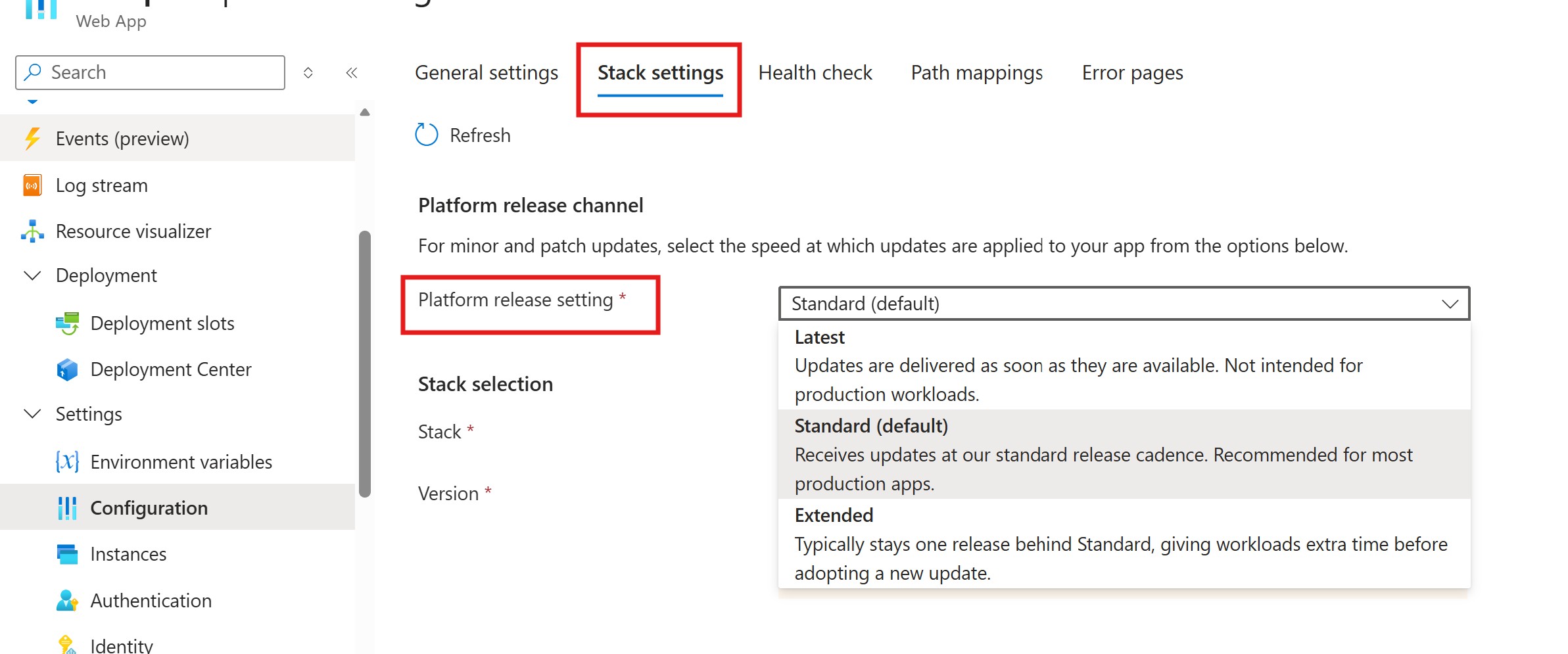
<p>You can configure the <strong>Platform release setting</strong> from the <strong>Stack settings</strong> section in the Azure portal.</p>

<p>The setting supports three values:</p>

<table>
  <thead>
    <tr>
      <th>Channel</th>
      <th>Behavior</th>
      <th>Recommended for</th>
    </tr>
  </thead>
  <tbody>
    <tr>
      <td><strong>Latest</strong></td>
      <td>Updates are delivered as soon as they are available</td>
      <td>Not intended for production workloads</td>
    </tr>
    <tr>
      <td><strong>Standard</strong></td>
      <td>Default setting. Recieves updates at our standard release cadence</td>
      <td>Recommended for most production apps</td>
    </tr>
    <tr>
      <td><strong>Extended</strong></td>
      <td>Typically stays one release behind standard</td>
      <td>Apps that need extra time before adopting newer patches</td>
    </tr>
  </tbody>
</table>

<p>By default, apps are set to <strong>Standard</strong>. This gives you additional time to test the latest patch before your app moves to it.</p>

<p>Choose <strong>Latest</strong> when security and immediate access to the newest runtime patches are your priority. Choose <strong>Extended</strong> when your application needs more validation time before adopting newer patch versions.</p>

<h2 id="how-channels-move-forward">How channels move forward</h2>

<p>When a new runtime patch is available, App Service first rolls it out through the <strong>Latest</strong> channel using a faster release cadence. The same patch then continues through the normal rollout process and becomes available in the <strong>Standard</strong> channel after it has progressed further through validation and rollout. <strong>Extended</strong> remains further behind Standard to provide additional validation time for apps that need it.</p>

<p>For example, with the current .NET 10 rollout, the channels look like this:</p>

<table>
  <thead>
    <tr>
      <th>Stack</th>
      <th style="text-align: right">Runtime version</th>
      <th style="text-align: right">Latest</th>
      <th style="text-align: right">Standard</th>
      <th style="text-align: right">Extended</th>
    </tr>
  </thead>
  <tbody>
    <tr>
      <td>DOTNETCORE</td>
      <td style="text-align: right">10</td>
      <td style="text-align: right">10.0.7</td>
      <td style="text-align: right">10.0.4</td>
      <td style="text-align: right">10.0.2</td>
    </tr>
  </tbody>
</table>

<p>As the .NET 10 rollout progresses, the <strong>10.0.7</strong> patch will first be available through the <strong>Latest</strong> channel, then move to <strong>Standard</strong> through the normal rollout cadence.</p>

<p>For some stacks, <strong>Standard</strong> and <strong>Extended</strong> may currently show the same patch version. This is expected while the release channels are still moving through their rollout cadence. As additional rollout waves progress, the channel versions will separate and reflect the intended behavior for each channel.</p>

<h2 id="configure-platform-release-channel">Configure Platform Release Channel</h2>

<p>You can configure it on the Azure portal</p>

<p><img src="/media/2026/05/prc.jpg" alt="PRC" /></p>

<p>You can also configure the release channel using Azure CLI.</p>

<p>To move to the latest available patch channel:</p>

<div class="language-bash highlighter-rouge"><div class="highlight"><pre class="highlight"><code>az webapp update <span class="se">\</span>
  <span class="nt">--resource-group</span> &lt;resource-group&gt; <span class="se">\</span>
  <span class="nt">--name</span> &lt;site-name&gt; <span class="se">\</span>
  <span class="nt">--platform-release-channel</span> Latest
</code></pre></div></div>

<p>To use the default channel:</p>

<div class="language-bash highlighter-rouge"><div class="highlight"><pre class="highlight"><code>az webapp update <span class="se">\</span>
  <span class="nt">--resource-group</span> &lt;resource-group&gt; <span class="se">\</span>
  <span class="nt">--name</span> &lt;site-name&gt; <span class="se">\</span>
  <span class="nt">--platform-release-channel</span> Standard
</code></pre></div></div>

<p>To give your app more time before adopting newer patches:</p>

<div class="language-bash highlighter-rouge"><div class="highlight"><pre class="highlight"><code>az webapp update <span class="se">\</span>
  <span class="nt">--resource-group</span> &lt;resource-group&gt; <span class="se">\</span>
  <span class="nt">--name</span> &lt;site-name&gt; <span class="se">\</span>
  <span class="nt">--platform-release-channel</span> Extended
</code></pre></div></div>

<h2 id="summary">Summary</h2>

<p>Platform Release Channel gives you a simple way to control the pace at which runtime patch updates are applied to your Linux apps on Azure App Service.</p>

<p>Use <strong>Latest</strong> when you want the newest available patches as soon as they are rolled out. Use <strong>Standard</strong> for the default balance between currency and stability. Use <strong>Extended</strong> when your app needs more validation time before moving to newer runtime patches.</p>]]></content><author><name>Azure App Service</name></author><summary type="html"><![CDATA[Azure App Service for Linux is introducing Platform Release Channel, a new setting that gives you more control over when runtime patch updates are applied to your app.]]></summary></entry><entry><title type="html">PHP 8.5 is now available on Azure App Service for Linux</title><link href="https://azure.github.io/2026/04/10/php85-available.html" rel="alternate" type="text/html" title="PHP 8.5 is now available on Azure App Service for Linux" /><published>2026-04-10T00:00:00+00:00</published><updated>2026-04-10T00:00:00+00:00</updated><id>https://azure.github.io/2026/04/10/php85-available</id><content type="html" xml:base="https://azure.github.io/2026/04/10/php85-available.html"><![CDATA[<p>PHP 8.5 is now available on Azure App Service for Linux across all public regions. You can create a new PHP 8.5 app through the Azure portal, automate it with the Azure CLI, or deploy using ARM/Bicep templates.</p>

<p>PHP 8.5 brings several useful runtime improvements. It includes <strong>better diagnostics</strong>, with fatal errors now providing a backtrace, which can make troubleshooting easier. It also adds the <strong>pipe operator (<code class="language-plaintext highlighter-rouge">|&gt;</code>)</strong> for cleaner, more readable code, along with broader improvements in syntax, performance, and type safety. You can take advantage of these improvements while continuing to use the deployment and management experience you already know in App Service.</p>

<p>For the full list of features, deprecations, and migration notes, see the official PHP 8.5 release page:
<a href="https://www.php.net/releases/8.5/en.php">https://www.php.net/releases/8.5/en.php</a></p>

<h3 id="getting-started">Getting started</h3>

<ol>
  <li><a href="https://learn.microsoft.com/azure/app-service/quickstart-php?tabs=cli&amp;pivots=platform-linux">Create a PHP web app in Azure App Service</a></li>
  <li><a href="https://learn.microsoft.com/azure/app-service/configure-language-php?pivots=platform-linux">Configure a PHP app for Azure App Service</a></li>
</ol>]]></content><author><name>Azure App Service</name></author><summary type="html"><![CDATA[PHP 8.5 is now available on Azure App Service for Linux across all public regions. You can create a new PHP 8.5 app through the Azure portal, automate it with the Azure CLI, or deploy using ARM/Bicep templates.]]></summary></entry><entry><title type="html">Agentic IIS Migration to Managed Instance on Azure App Service</title><link href="https://azure.github.io/2026/04/09/Agentic_IIS_Migration_to_Managed_Instance_On_AppService.html" rel="alternate" type="text/html" title="Agentic IIS Migration to Managed Instance on Azure App Service" /><published>2026-04-09T00:00:00+00:00</published><updated>2026-04-09T00:00:00+00:00</updated><id>https://azure.github.io/2026/04/09/Agentic_IIS_Migration_to_Managed_Instance_On_AppService</id><content type="html" xml:base="https://azure.github.io/2026/04/09/Agentic_IIS_Migration_to_Managed_Instance_On_AppService.html"><![CDATA[<p><em>Migrating legacy ASP.NET Framework applications from IIS to Azure App Service — guided by AI agents, powered by the Model Context Protocol.</em></p>

<hr />

<h2 id="introduction">Introduction</h2>

<p>Enterprises running ASP.NET Framework workloads on Windows Server with IIS face a familiar dilemma: modernize or stay put. The applications work, the infrastructure is stable, and nobody wants to be the person who breaks production during a cloud migration. But the cost of maintaining aging on-premises servers, patching Windows, and managing IIS keeps climbing.</p>

<p>Azure App Service has long been the lift-and-shift destination for these workloads. But what about applications that depend on <strong>Windows registry keys</strong>, <strong>COM components</strong>, <strong>SMTP relay</strong>, <strong>MSMQ queues</strong>, <strong>local file system access</strong>, or <strong>custom fonts</strong>? These OS-level dependencies have historically been migration blockers — forcing teams into expensive re-architecture or keeping them anchored to VMs.</p>

<p><strong>Managed Instance on Azure App Service</strong> changes this equation entirely. And the <strong>IIS Migration MCP Server</strong> makes migration guided, intelligent, and safe — with AI agents that know what to ask, what to check, and what to generate at every step.</p>

<hr />

<h2 id="what-is-managed-instance-on-azure-app-service">What Is Managed Instance on Azure App Service?</h2>

<p>Managed Instance on App Service is Azure’s answer to applications that need <strong>OS-level customization</strong> beyond what standard App Service provides. It runs on the <strong>PremiumV4 (PV4)</strong> SKU with <code class="language-plaintext highlighter-rouge">IsCustomMode=true</code>, giving your app access to:</p>

<table>
  <thead>
    <tr>
      <th>Capability</th>
      <th>What It Enables</th>
    </tr>
  </thead>
  <tbody>
    <tr>
      <td><strong>Registry Adapters</strong></td>
      <td>Redirect Windows Registry reads to Azure Key Vault secrets — no code changes</td>
    </tr>
    <tr>
      <td><strong>Storage Adapters</strong></td>
      <td>Mount Azure Files, local SSD, or private VNET storage as drive letters (e.g., <code class="language-plaintext highlighter-rouge">D:\</code>, <code class="language-plaintext highlighter-rouge">E:\</code>)</td>
    </tr>
    <tr>
      <td><strong>install.ps1 Startup Script</strong></td>
      <td>Run PowerShell at instance startup to install Windows features (SMTP, MSMQ), register COM components, install MSI packages, deploy custom fonts</td>
    </tr>
    <tr>
      <td><strong>Custom Mode</strong></td>
      <td>Full access to the Windows instance for configuration beyond standard PaaS guardrails</td>
    </tr>
  </tbody>
</table>

<p><strong>The key constraint</strong>: Managed Instance on App Service <strong>requires PV4 SKU</strong> with <strong>IsCustomMode=true</strong>. No other SKU combination supports it.</p>

<h3 id="why-managed-instance-matters-for-legacy-apps">Why Managed Instance Matters for Legacy Apps</h3>

<p>Consider a classic enterprise ASP.NET application that:</p>
<ul>
  <li>Reads license keys from <code class="language-plaintext highlighter-rouge">HKLM\SOFTWARE\MyApp</code> in the Windows Registry</li>
  <li>Uses a COM component for PDF generation registered via <code class="language-plaintext highlighter-rouge">regsvr32</code></li>
  <li>Sends email through a local SMTP relay</li>
  <li>Writes reports to <code class="language-plaintext highlighter-rouge">D:\Reports\</code> on a local drive</li>
  <li>Uses a custom corporate font for PDF rendering</li>
</ul>

<p>With standard App Service, you’d need to rewrite every one of these dependencies. With Managed Instance on App Service, you can:</p>
<ul>
  <li>Map registry reads to Key Vault secrets via <strong>Registry Adapters</strong></li>
  <li>Mount Azure Files as <code class="language-plaintext highlighter-rouge">D:\</code> via <strong>Storage Adapters</strong></li>
  <li>Enable SMTP Server via <strong>install.ps1</strong></li>
  <li>Register the COM DLL via <strong>install.ps1</strong> (<code class="language-plaintext highlighter-rouge">regsvr32</code>)</li>
  <li>Install the custom font via <strong>install.ps1</strong></li>
</ul>

<p><strong>Zero application code changes required.</strong></p>

<blockquote>
  <p><strong>Note</strong>: When migrating your web applications to Managed Instance on Azure App Service, in the majority of use cases zero application code changes may be required — but depending on your specific web app, some code changes may be necessary.</p>
</blockquote>

<h3 id="microsoft-learn-resources">Microsoft Learn Resources</h3>

<ul>
  <li><a href="https://learn.microsoft.com/en-us/azure/app-service/overview-managed-instance">Managed Instance on App Service Overview</a></li>
  <li><a href="https://learn.microsoft.com/en-us/azure/app-service/">Azure App Service Documentation</a></li>
  <li><a href="https://learn.microsoft.com/en-us/azure/app-service/app-service-migration-assistant">App Service Migration Assistant Tool</a></li>
  <li><a href="https://learn.microsoft.com/en-us/azure/app-service/manage-move-across-regions">Migrate to Azure App Service</a></li>
  <li><a href="https://learn.microsoft.com/en-us/azure/app-service/overview-hosting-plans">Azure App Service Plans Overview</a></li>
  <li><a href="https://learn.microsoft.com/en-us/azure/app-service/app-service-configure-premium-tier">PremiumV4 Pricing Tier</a></li>
  <li><a href="https://learn.microsoft.com/en-us/azure/key-vault/general/overview">Azure Key Vault</a></li>
  <li><a href="https://learn.microsoft.com/en-us/azure/storage/files/storage-files-introduction">Azure Files</a></li>
  <li><a href="https://learn.microsoft.com/en-us/azure/migrate/appcat/dotnet">Azure Migrate application and code assessment for .NET</a></li>
  <li><a href="https://learn.microsoft.com/en-us/dotnet/azure/migration/appcat/install">Install Azure Migrate application and code assessment for .NET</a></li>
  <li><a href="https://learn.microsoft.com/en-us/dotnet/azure/migration/appcat/interpret-results">Interpret the analysis results</a></li>
</ul>

<hr />

<h2 id="why-agentic-migration-the-case-for-ai-guided-iis-migration">Why Agentic Migration? The Case for AI-Guided IIS Migration</h2>

<h3 id="the-problem-with-traditional-migration">The Problem with Traditional Migration</h3>

<p>Microsoft provides excellent PowerShell scripts for IIS migration — <code class="language-plaintext highlighter-rouge">Get-SiteReadiness.ps1</code>, <code class="language-plaintext highlighter-rouge">Get-SitePackage.ps1</code>, <code class="language-plaintext highlighter-rouge">Generate-MigrationSettings.ps1</code>, and <code class="language-plaintext highlighter-rouge">Invoke-SiteMigration.ps1</code>. They’re free, well-tested, and reliable. So why wrap them in an AI-powered system?</p>

<p>Because <strong>the scripts are powerful but not intelligent.</strong> They execute what you tell them to. They don’t tell you <em>what</em> to do.</p>

<p>Here’s what a traditional migration looks like:</p>

<ol>
  <li>Run readiness checks — get a wall of JSON with cryptic check IDs like <code class="language-plaintext highlighter-rouge">ContentSizeCheck</code>, <code class="language-plaintext highlighter-rouge">ConfigErrorCheck</code>, <code class="language-plaintext highlighter-rouge">GACCheck</code></li>
  <li>Manually interpret 15+ readiness checks per site across dozens of sites</li>
  <li>Decide whether each site needs Managed Instance or standard App Service (how?)</li>
  <li>Figure out which dependencies need registry adapters vs. storage adapters vs. install.ps1 (the “Managed Instance provisioning split”)</li>
  <li>Write the install.ps1 script by hand for each combination of OS features</li>
  <li>Author ARM templates for adapter configurations (Key Vault references, storage mount specs, RBAC assignments)</li>
  <li>Wire together <code class="language-plaintext highlighter-rouge">PackageResults.json</code> → <code class="language-plaintext highlighter-rouge">MigrationSettings.json</code> with correct Managed Instance fields (<code class="language-plaintext highlighter-rouge">Tier=PremiumV4</code>, <code class="language-plaintext highlighter-rouge">IsCustomMode=true</code>)</li>
  <li>Hope you didn’t misconfigure anything before deploying to Azure</li>
</ol>

<p>Even experienced Azure engineers find this time-consuming, error-prone, and tedious — especially across a fleet of 20, 50, or 100+ IIS sites.</p>

<h3 id="what-agentic-migration-changes">What Agentic Migration Changes</h3>

<p>The IIS Migration MCP Server introduces an <strong>AI orchestration layer</strong> that transforms this manual grind into a guided conversation:</p>

<table>
  <thead>
    <tr>
      <th>Traditional Approach</th>
      <th>Agentic Approach</th>
    </tr>
  </thead>
  <tbody>
    <tr>
      <td>Read raw JSON output from scripts</td>
      <td>AI summarizes readiness as tables with plain-English descriptions</td>
    </tr>
    <tr>
      <td>Memorize 15 check types and their severity</td>
      <td>AI enriches each check with title, description, recommendation, and documentation links</td>
    </tr>
    <tr>
      <td>Manually decide Managed Instance vs App Service</td>
      <td><code class="language-plaintext highlighter-rouge">recommend_target</code> analyzes all signals and recommends with confidence + reasoning</td>
    </tr>
    <tr>
      <td>Write install.ps1 from scratch</td>
      <td><code class="language-plaintext highlighter-rouge">generate_install_script</code> builds it from detected features</td>
    </tr>
    <tr>
      <td>Author ARM templates manually</td>
      <td><code class="language-plaintext highlighter-rouge">generate_adapter_arm_template</code> generates full templates with RBAC guidance</td>
    </tr>
    <tr>
      <td>Wire JSON artifacts between phases by hand</td>
      <td>Agents pass <code class="language-plaintext highlighter-rouge">readiness_results_path</code> → <code class="language-plaintext highlighter-rouge">package_results_path</code> → <code class="language-plaintext highlighter-rouge">migration_settings_path</code> automatically</td>
    </tr>
    <tr>
      <td>Pray you set PV4 + IsCustomMode correctly</td>
      <td><strong>Enforced automatically</strong> — every tool validates Managed Instance constraints</td>
    </tr>
    <tr>
      <td>Deploy and find out what broke</td>
      <td><code class="language-plaintext highlighter-rouge">confirm_migration</code> presents a full cost/resource summary before touching Azure</td>
    </tr>
  </tbody>
</table>

<p><strong>The core value proposition: the AI knows the Managed Instance provisioning split.</strong> It knows that registry access needs an ARM template with Key Vault-backed adapters, while SMTP needs an <code class="language-plaintext highlighter-rouge">install.ps1</code> section enabling the Windows SMTP Server feature. You don’t need to know this. The system detects it from your IIS configuration and source code analysis, then generates exactly the right artifacts.</p>

<h3 id="human-in-the-loop-safety">Human-in-the-Loop Safety</h3>

<p>Agentic doesn’t mean autonomous. The system has explicit gates:</p>

<ul>
  <li><strong>Phase 1 → Phase 2</strong>: “Do you want to assess these sites, or skip to packaging?”</li>
  <li><strong>Phase 3</strong>: “Here’s my recommendation — Managed Instance for Site A (COM + Registry), standard for Site B. Agree?”</li>
  <li><strong>Phase 4</strong>: “Review MigrationSettings.json before proceeding”</li>
  <li><strong>Phase 5</strong>: “This will create billable Azure resources. Type ‘yes’ to confirm”</li>
</ul>

<p>The AI accelerates the workflow; the human retains control over every decision.</p>

<hr />

<h2 id="architecture-how-the-mcp-server-works">Architecture: How the MCP Server Works</h2>

<p>The system is built on the <strong>Model Context Protocol (MCP)</strong>, an open protocol that lets AI assistants like GitHub Copilot, Claude, or Cursor call external tools through a standardized interface.</p>

<div class="language-plaintext highlighter-rouge"><div class="highlight"><pre class="highlight"><code>┌──────────────────────────────────────────────────────────────────┐
│  VS Code + Copilot Chat                                          │
│    @iis-migrate orchestrator agent                               │
│      ├── iis-discover   (Phase 1)                                │
│      ├── iis-assess     (Phase 2)                                │
│      ├── iis-recommend  (Phase 3)                                │
│      ├── iis-deploy-plan (Phase 4)                               │
│      └── iis-execute    (Phase 5)                                │
└─────────────┬────────────────────────────────────────────────────┘
              │  stdio JSON-RPC (MCP Transport)
              ▼
┌──────────────────────────────────────────────────────────────────┐
│  FastMCP Server (server.py)                                      │
│    13 Python Tool Modules (tools/*.py)                           │
│      └── ps_runner.py (Python → PowerShell bridge)               │
│            └── Downloaded PowerShell Scripts (user-configured)    │
│                  ├── Local IIS (discovery, packaging)            │
│                  └── Azure ARM API (deployment)                  │
└──────────────────────────────────────────────────────────────────┘
</code></pre></div></div>

<p>The server exposes <strong>13 MCP tools</strong> organized across <strong>5 phases</strong>, orchestrated by <strong>6 Copilot agents</strong> (1 orchestrator + 5 specialist subagents).</p>

<blockquote>
  <p><strong>Important:</strong> The PowerShell migration scripts are <strong>not included</strong> in this repository.
Users must download them from <a href="https://appmigration.microsoft.com/api/download/psscripts/AppServiceMigrationScripts.zip">GitHub</a>
and configure the path using the <code class="language-plaintext highlighter-rouge">configure_scripts_path</code> tool. This ensures you always
use the latest version of Microsoft’s scripts, avoiding version mismatch issues.</p>
</blockquote>

<hr />

<h2 id="the-13-mcp-tools-complete-reference">The 13 MCP Tools: Complete Reference</h2>

<h3 id="phase-0--setup">Phase 0 — Setup</h3>

<h4 id="configure_scripts_path"><code class="language-plaintext highlighter-rouge">configure_scripts_path</code></h4>
<p><strong>Purpose</strong>: Point the server to Microsoft’s downloaded migration PowerShell scripts.</p>

<p>Before any migration work, you need to download the scripts from <a href="https://appmigration.microsoft.com/api/download/psscripts/AppServiceMigrationScripts.zip">GitHub</a>, unzip them, and tell the server where they are.</p>

<div class="language-plaintext highlighter-rouge"><div class="highlight"><pre class="highlight"><code>"Configure scripts path to C:\MigrationScripts"
</code></pre></div></div>

<hr />

<h3 id="phase-1--discovery">Phase 1 — Discovery</h3>

<h4 id="1-discover_iis_sites">1. <code class="language-plaintext highlighter-rouge">discover_iis_sites</code></h4>
<p><strong>Purpose</strong>: Scan the local IIS server and run readiness checks on every web site.</p>

<p>This is the entry point for every migration. It calls <code class="language-plaintext highlighter-rouge">Get-SiteReadiness.ps1</code> under the hood, which:</p>
<ul>
  <li>Enumerates all IIS web sites, application pools, bindings, and virtual directories</li>
  <li>Runs <strong>15 readiness checks</strong> per site (config errors, HTTPS bindings, non-HTTP protocols, TCP ports, location tags, app pool settings, app pool identity, virtual directories, content size, global modules, ISAPI filters, authentication, framework version, connection strings, and more)</li>
  <li>Detects source code artifacts (<code class="language-plaintext highlighter-rouge">.sln</code>, <code class="language-plaintext highlighter-rouge">.csproj</code>, <code class="language-plaintext highlighter-rouge">.cs</code>, <code class="language-plaintext highlighter-rouge">.vb</code>) near site physical paths</li>
</ul>

<p><strong>Output</strong>: <code class="language-plaintext highlighter-rouge">ReadinessResults.json</code> with per-site status:
| Status | Meaning |
|——–|———|
| <code class="language-plaintext highlighter-rouge">READY</code> | No issues detected — clear for migration |
| <code class="language-plaintext highlighter-rouge">READY_WITH_WARNINGS</code> | Minor issues that won’t block migration |
| <code class="language-plaintext highlighter-rouge">READY_WITH_ISSUES</code> | Non-fatal issues that need attention |
| <code class="language-plaintext highlighter-rouge">BLOCKED</code> | Fatal issues (e.g., content &gt; 2GB) — cannot migrate as-is |</p>

<p><strong>Requires</strong>: Administrator privileges, IIS installed.</p>

<h4 id="2-choose_assessment_mode">2. <code class="language-plaintext highlighter-rouge">choose_assessment_mode</code></h4>
<p><strong>Purpose</strong>: Route each discovered site into the appropriate next step.</p>

<p>After discovery, you decide the path for each site:</p>
<ul>
  <li><strong><code class="language-plaintext highlighter-rouge">assess_all</code></strong>: Run detailed assessment on all non-blocked sites</li>
  <li><strong><code class="language-plaintext highlighter-rouge">package_and_migrate</code></strong>: Skip assessment, proceed directly to packaging (for sites you already know well)</li>
</ul>

<p>The tool classifies each site into one of five actions:</p>
<ul>
  <li><code class="language-plaintext highlighter-rouge">assess_config_only</code> — IIS/web.config analysis</li>
  <li><code class="language-plaintext highlighter-rouge">assess_config_and_source</code> — Config + source code analysis (when source is detected)</li>
  <li><code class="language-plaintext highlighter-rouge">package</code> — Skip to packaging</li>
  <li><code class="language-plaintext highlighter-rouge">blocked</code> — Fatal errors, cannot proceed</li>
  <li><code class="language-plaintext highlighter-rouge">skip</code> — User chose to exclude</li>
</ul>

<hr />

<h3 id="phase-2--assessment">Phase 2 — Assessment</h3>

<h4 id="3-assess_site_readiness">3. <code class="language-plaintext highlighter-rouge">assess_site_readiness</code></h4>
<p><strong>Purpose</strong>: Get a detailed, human-readable readiness assessment for a specific site.</p>

<p>Takes the raw readiness data from Phase 1 and enriches each check with:</p>
<ul>
  <li><strong>Title</strong>: Plain-English name (e.g., “Global Assembly Cache (GAC) Dependencies”)</li>
  <li><strong>Description</strong>: What the check found and why it matters</li>
  <li><strong>Recommendation</strong>: Specific guidance on how to resolve the issue</li>
  <li><strong>Category</strong>: Grouping (Configuration, Security, Compatibility)</li>
  <li><strong>Documentation Link</strong>: Microsoft Learn URL for further reading</li>
</ul>

<p>This enrichment comes from <code class="language-plaintext highlighter-rouge">WebAppCheckResources.resx</code>, an XML resource file that maps check IDs to detailed metadata. Without this tool, you’d see <code class="language-plaintext highlighter-rouge">GACCheck: FAIL</code> — with it, you see the full context.</p>

<p><strong>Output</strong>: Overall status, enriched failed/warning checks, framework version, pipeline mode, binding details.</p>

<h4 id="4-assess_source_code">4. <code class="language-plaintext highlighter-rouge">assess_source_code</code></h4>
<p><strong>Purpose</strong>: Analyze an <a href="https://learn.microsoft.com/en-us/azure/migrate/appcat/dotnet">Azure Migrate application and code assessment for .NET</a> JSON report to identify Managed Instance-relevant source code dependencies.</p>

<p>If your application has source code and you’ve run the assessment tool against it, this tool parses the results and maps findings to migration actions:</p>

<table>
  <thead>
    <tr>
      <th>Dependency Detected</th>
      <th>Migration Action</th>
    </tr>
  </thead>
  <tbody>
    <tr>
      <td>Windows Registry access</td>
      <td>Registry Adapter (ARM template)</td>
    </tr>
    <tr>
      <td>Local file system I/O / hardcoded paths</td>
      <td>Storage Adapter (ARM template)</td>
    </tr>
    <tr>
      <td>SMTP usage</td>
      <td>install.ps1 (SMTP Server feature)</td>
    </tr>
    <tr>
      <td>COM Interop</td>
      <td>install.ps1 (regsvr32/RegAsm)</td>
    </tr>
    <tr>
      <td>Global Assembly Cache (GAC)</td>
      <td>install.ps1 (GAC install)</td>
    </tr>
    <tr>
      <td>Message Queuing (MSMQ)</td>
      <td>install.ps1 (MSMQ feature)</td>
    </tr>
    <tr>
      <td>Certificate access</td>
      <td>Key Vault integration</td>
    </tr>
  </tbody>
</table>

<p>The tool matches rules from the assessment output against known Managed Instance-relevant patterns. For a complete list of rules and categories, see <a href="https://learn.microsoft.com/en-us/dotnet/azure/migration/appcat/interpret-results">Interpret the analysis results</a>.</p>

<p><strong>Output</strong>: Issues categorized as mandatory/optional/potential, plus <code class="language-plaintext highlighter-rouge">install_script_features</code> and <code class="language-plaintext highlighter-rouge">adapter_features</code> lists that feed directly into Phase 3 tools.</p>

<hr />

<h3 id="phase-3--recommendation--provisioning">Phase 3 — Recommendation &amp; Provisioning</h3>

<h4 id="5-suggest_migration_approach">5. <code class="language-plaintext highlighter-rouge">suggest_migration_approach</code></h4>
<p><strong>Purpose</strong>: Recommend the right migration tool/approach for the scenario.</p>

<p>This is a routing tool that considers:</p>
<ul>
  <li><strong>Source code available?</strong> → Recommend the App Modernization MCP server for code-level changes</li>
  <li><strong>No source code?</strong> → Recommend this IIS Migration MCP (lift-and-shift)</li>
  <li><strong>OS customization needed?</strong> → Highlight Managed Instance on App Service as the target</li>
</ul>

<h4 id="6-recommend_target">6. <code class="language-plaintext highlighter-rouge">recommend_target</code></h4>
<p><strong>Purpose</strong>: Recommend the Azure deployment target for each site based on all assessment data.</p>

<p>This is the intelligence center of the system. It analyzes config assessments and source code findings to recommend:</p>

<table>
  <thead>
    <tr>
      <th>Target</th>
      <th>When Recommended</th>
      <th>SKU</th>
    </tr>
  </thead>
  <tbody>
    <tr>
      <td><strong>MI_AppService</strong></td>
      <td>Registry, COM, MSMQ, SMTP, local file I/O, GAC, or Windows Service dependencies detected</td>
      <td>PremiumV4 (PV4)</td>
    </tr>
    <tr>
      <td><strong>AppService</strong></td>
      <td>Standard web app, no OS-level dependencies</td>
      <td>PremiumV2 (PV2)</td>
    </tr>
    <tr>
      <td><strong>ContainerApps</strong></td>
      <td>Microservices architecture or container-first preference</td>
      <td>N/A</td>
    </tr>
  </tbody>
</table>

<p>Each recommendation comes with:</p>
<ul>
  <li><strong>Confidence</strong>: <code class="language-plaintext highlighter-rouge">high</code> or <code class="language-plaintext highlighter-rouge">medium</code></li>
  <li><strong>Reasoning</strong>: Full explanation of why this target was chosen</li>
  <li><strong>Managed Instance reasons</strong>: Specific dependencies that require Managed Instance</li>
  <li><strong>Blockers</strong>: Issues that prevent migration entirely</li>
  <li><strong>install_script_features</strong>: What the install.ps1 needs to enable</li>
  <li><strong>adapter_features</strong>: What the ARM template needs to configure</li>
  <li><strong>Provisioning guidance</strong>: Step-by-step instructions for what to do next</li>
</ul>

<h4 id="7-generate_install_script">7. <code class="language-plaintext highlighter-rouge">generate_install_script</code></h4>
<p><strong>Purpose</strong>: Generate an <code class="language-plaintext highlighter-rouge">install.ps1</code> PowerShell script for OS-level feature enablement on Managed Instance.</p>

<p>This handles the <strong>OS-level</strong> side of the Managed Instance provisioning split. It generates a startup script that includes sections for:</p>

<table>
  <thead>
    <tr>
      <th>Feature</th>
      <th>What the Script Does</th>
    </tr>
  </thead>
  <tbody>
    <tr>
      <td><strong>SMTP</strong></td>
      <td><code class="language-plaintext highlighter-rouge">Install-WindowsFeature SMTP-Server</code>, configure smart host relay</td>
    </tr>
    <tr>
      <td><strong>MSMQ</strong></td>
      <td>Install MSMQ, create application queues</td>
    </tr>
    <tr>
      <td><strong>COM/MSI</strong></td>
      <td>Run <code class="language-plaintext highlighter-rouge">msiexec</code> for MSI installers, <code class="language-plaintext highlighter-rouge">regsvr32</code>/<code class="language-plaintext highlighter-rouge">RegAsm</code> for COM registration</td>
    </tr>
    <tr>
      <td><strong>Crystal Reports</strong></td>
      <td>Install SAP Crystal Reports runtime MSI</td>
    </tr>
    <tr>
      <td><strong>Custom Fonts</strong></td>
      <td>Copy <code class="language-plaintext highlighter-rouge">.ttf</code>/<code class="language-plaintext highlighter-rouge">.otf</code> to <code class="language-plaintext highlighter-rouge">C:\Windows\Fonts</code>, register in registry</td>
    </tr>
  </tbody>
</table>

<p>The script can auto-detect needed features from config and source assessments, or you can specify them manually.</p>

<h4 id="8-generate_adapter_arm_template">8. <code class="language-plaintext highlighter-rouge">generate_adapter_arm_template</code></h4>
<p><strong>Purpose</strong>: Generate an ARM template for Managed Instance registry and storage adapters.</p>

<p>This handles the <strong>platform-level</strong> side of the Managed Instance provisioning split. It generates a deployable ARM template that configures:</p>

<p><strong>Registry Adapters</strong> (Key Vault-backed):</p>
<ul>
  <li>Map Windows Registry paths (e.g., <code class="language-plaintext highlighter-rouge">HKLM\SOFTWARE\MyApp\LicenseKey</code>) to Key Vault secrets</li>
  <li>Your application reads the registry as before; Managed Instance redirects the read to Key Vault transparently</li>
</ul>

<p><strong>Storage Adapters</strong> (three types):
| Type | Description | Credentials |
|——|————-|————-|
| <strong>AzureFiles</strong> | Mount Azure Files SMB share as a drive letter | Storage account key in Key Vault |
| <strong>Custom</strong> | Mount storage over private endpoint via VNET | Requires VNET integration |
| <strong>LocalStorage</strong> | Allocate local SSD on the Managed Instance as a drive letter | None needed |</p>

<p>The template also includes:</p>
<ul>
  <li>Managed Identity configuration</li>
  <li>RBAC role assignments guidance (Key Vault Secrets User, Storage File Data SMB Share Contributor, etc.)</li>
  <li>Deployment CLI commands ready to copy-paste</li>
</ul>

<hr />

<h3 id="phase-4--deployment-planning--packaging">Phase 4 — Deployment Planning &amp; Packaging</h3>

<h4 id="9-plan_deployment">9. <code class="language-plaintext highlighter-rouge">plan_deployment</code></h4>
<p><strong>Purpose</strong>: Plan the Azure App Service deployment — plans, SKUs, site assignments.</p>

<p>Collects your Azure details (subscription, resource group, region) and creates a validated deployment plan:</p>
<ul>
  <li>Assigns sites to App Service Plans</li>
  <li><strong>Enforces PV4 + IsCustomMode=true for Managed Instance</strong> — won’t let you accidentally use the wrong SKU</li>
  <li>Supports <code class="language-plaintext highlighter-rouge">single_plan</code> (all sites on one plan) or <code class="language-plaintext highlighter-rouge">multi_plan</code> (separate plans)</li>
  <li>Optionally queries Azure for existing Managed Instance plans you can reuse</li>
</ul>

<h4 id="10-package_site">10. <code class="language-plaintext highlighter-rouge">package_site</code></h4>
<p><strong>Purpose</strong>: Package IIS site content into ZIP files for deployment.</p>

<p>Calls <code class="language-plaintext highlighter-rouge">Get-SitePackage.ps1</code> to:</p>
<ul>
  <li>Compress site binaries + <code class="language-plaintext highlighter-rouge">web.config</code> into deployment-ready ZIPs</li>
  <li>Optionally inject <code class="language-plaintext highlighter-rouge">install.ps1</code> into the package (so it deploys alongside the app)</li>
  <li>Handle sites with non-fatal issues (configurable)</li>
</ul>

<p><strong>Size limit</strong>: 2 GB per site (enforced by System.IO.Compression).</p>

<h4 id="11-generate_migration_settings">11. <code class="language-plaintext highlighter-rouge">generate_migration_settings</code></h4>
<p><strong>Purpose</strong>: Create the <code class="language-plaintext highlighter-rouge">MigrationSettings.json</code> deployment configuration.</p>

<p>This is the final configuration artifact. It calls <code class="language-plaintext highlighter-rouge">Generate-MigrationSettings.ps1</code> and then post-processes the output to inject Managed Instance-specific fields:</p>

<blockquote>
  <p><strong>Important</strong>: The Managed Instance on App Service Plan is <strong>not automatically created</strong> by the migration tools. You must <strong>pre-create the App Service Plan</strong> (PV4 SKU with <code class="language-plaintext highlighter-rouge">IsCustomMode=true</code>) in the Azure portal or via CLI before generating migration settings. When running <code class="language-plaintext highlighter-rouge">generate_migration_settings</code>, provide the <strong>name of your existing Managed Instance plan</strong> so the settings file references it correctly.</p>
</blockquote>

<div class="language-json highlighter-rouge"><div class="highlight"><pre class="highlight"><code><span class="p">{</span><span class="w">
  </span><span class="nl">"AppServicePlan"</span><span class="p">:</span><span class="w"> </span><span class="s2">"mi-plan-eastus"</span><span class="p">,</span><span class="w">
  </span><span class="nl">"Tier"</span><span class="p">:</span><span class="w"> </span><span class="s2">"PremiumV4"</span><span class="p">,</span><span class="w">
  </span><span class="nl">"IsCustomMode"</span><span class="p">:</span><span class="w"> </span><span class="kc">true</span><span class="p">,</span><span class="w">
  </span><span class="nl">"InstallScriptPath"</span><span class="p">:</span><span class="w"> </span><span class="s2">"install.ps1"</span><span class="p">,</span><span class="w">
  </span><span class="nl">"Region"</span><span class="p">:</span><span class="w"> </span><span class="s2">"eastus"</span><span class="p">,</span><span class="w">
  </span><span class="nl">"Sites"</span><span class="p">:</span><span class="w"> </span><span class="p">[</span><span class="w">
    </span><span class="p">{</span><span class="w">
      </span><span class="nl">"IISSiteName"</span><span class="p">:</span><span class="w"> </span><span class="s2">"MyLegacyApp"</span><span class="p">,</span><span class="w">
      </span><span class="nl">"AzureSiteName"</span><span class="p">:</span><span class="w"> </span><span class="s2">"mylegacyapp-azure"</span><span class="p">,</span><span class="w">
      </span><span class="nl">"SitePackagePath"</span><span class="p">:</span><span class="w"> </span><span class="s2">"packagedsites/MyLegacyApp_Content.zip"</span><span class="w">
    </span><span class="p">}</span><span class="w">
  </span><span class="p">]</span><span class="w">
</span><span class="p">}</span><span class="w">
</span></code></pre></div></div>

<hr />

<h3 id="phase-5--execution">Phase 5 — Execution</h3>

<h4 id="12-confirm_migration">12. <code class="language-plaintext highlighter-rouge">confirm_migration</code></h4>
<p><strong>Purpose</strong>: Present a full migration summary and require explicit human confirmation.</p>

<p>Before touching Azure, this tool displays:</p>
<ul>
  <li>Total plans and sites to be created</li>
  <li>SKU and pricing tier per plan</li>
  <li>Whether Managed Instance is configured</li>
  <li>Cost warning for PV4 pricing</li>
  <li>Resource group, region, and subscription details</li>
</ul>

<p><strong>Nothing proceeds until the user explicitly confirms.</strong></p>

<h4 id="13-migrate_sites">13. <code class="language-plaintext highlighter-rouge">migrate_sites</code></h4>
<p><strong>Purpose</strong>: Deploy everything to Azure App Service. <strong>This creates billable resources.</strong></p>

<p>Calls <code class="language-plaintext highlighter-rouge">Invoke-SiteMigration.ps1</code>, which:</p>
<ol>
  <li>Sets Azure subscription context</li>
  <li>Creates/validates resource groups</li>
  <li>Creates App Service Plans (PV4 with IsCustomMode for Managed Instance)</li>
  <li>Creates Web Apps</li>
  <li>Configures .NET version, 32-bit mode, pipeline mode from the original IIS settings</li>
  <li>Sets up virtual directories and applications</li>
  <li>Disables basic authentication (FTP + SCM) for security</li>
  <li>Deploys ZIP packages via Azure REST API</li>
</ol>

<p><strong>Output</strong>: <code class="language-plaintext highlighter-rouge">MigrationResults.json</code> with per-site Azure URLs, Resource IDs, and deployment status.</p>

<hr />

<h2 id="the-6-copilot-agents">The 6 Copilot Agents</h2>

<p>The MCP tools are orchestrated by a team of specialized Copilot agents — each responsible for a specific phase of the migration lifecycle.</p>

<h3 id="iis-migrate--the-orchestrator"><code class="language-plaintext highlighter-rouge">@iis-migrate</code> — The Orchestrator</h3>

<p>The root agent that guides the entire migration. It:</p>
<ul>
  <li>Tracks progress across all 5 phases using a todo list</li>
  <li>Delegates work to specialist subagents</li>
  <li>Gates between phases — asks before transitioning</li>
  <li>Enforces the Managed Instance constraint (PV4 + IsCustomMode) at every decision point</li>
  <li>Never skips the Phase 5 confirmation gate</li>
</ul>

<p><strong>Usage</strong>: Open Copilot Chat and type <code class="language-plaintext highlighter-rouge">@iis-migrate I want to migrate my IIS applications to Azure</code></p>

<h3 id="iis-discover--discovery-specialist"><code class="language-plaintext highlighter-rouge">iis-discover</code> — Discovery Specialist</h3>

<p>Handles Phase 1. Runs <code class="language-plaintext highlighter-rouge">discover_iis_sites</code>, presents a summary table of all sites with their readiness status, and asks whether to assess or skip to packaging. Returns <code class="language-plaintext highlighter-rouge">readiness_results_path</code> and per-site routing plans.</p>

<h3 id="iis-assess--assessment-specialist"><code class="language-plaintext highlighter-rouge">iis-assess</code> — Assessment Specialist</h3>

<p>Handles Phase 2. Runs <code class="language-plaintext highlighter-rouge">assess_site_readiness</code> for every site, and <code class="language-plaintext highlighter-rouge">assess_source_code</code> when source code assessment results are available. Merges findings, highlights Managed Instance-relevant issues, and produces the adapter/install features lists that drive Phase 3.</p>

<h3 id="iis-recommend--recommendation-specialist"><code class="language-plaintext highlighter-rouge">iis-recommend</code> — Recommendation Specialist</h3>

<p>Handles Phase 3. Runs <code class="language-plaintext highlighter-rouge">recommend_target</code> for each site, then conditionally generates <code class="language-plaintext highlighter-rouge">install.ps1</code> and ARM adapter templates. Presents all recommendations with confidence levels and reasoning, and allows you to edit generated artifacts.</p>

<h3 id="iis-deploy-plan--deployment-planning-specialist"><code class="language-plaintext highlighter-rouge">iis-deploy-plan</code> — Deployment Planning Specialist</h3>

<p>Handles Phase 4. Collects Azure details, runs <code class="language-plaintext highlighter-rouge">plan_deployment</code>, <code class="language-plaintext highlighter-rouge">package_site</code>, and <code class="language-plaintext highlighter-rouge">generate_migration_settings</code>. Validates Managed Instance configuration, allows review and editing of MigrationSettings.json. <strong>Does not execute migration.</strong></p>

<h3 id="iis-execute--execution-specialist"><code class="language-plaintext highlighter-rouge">iis-execute</code> — Execution Specialist</h3>

<p>Handles Phase 5 only. Runs <code class="language-plaintext highlighter-rouge">confirm_migration</code> to present the final summary, then <strong>only proceeds with <code class="language-plaintext highlighter-rouge">migrate_sites</code> after receiving explicit “yes” confirmation.</strong> Reports results with Azure URLs and deployment status.</p>

<hr />

<h2 id="the-managed-instance-provisioning-split-a-critical-concept">The Managed Instance Provisioning Split: A Critical Concept</h2>

<p>One of the most important ideas Managed Instance introduces is the <strong>provisioning split</strong> — the division of OS dependencies into two categories that are configured through different mechanisms:</p>

<div class="language-plaintext highlighter-rouge"><div class="highlight"><pre class="highlight"><code>┌──────────────────────────────────────────────────────────────┐
│            MANAGED INSTANCE PROVISIONING SPLIT                │
├─────────────────────────────┬────────────────────────────────┤
│  ARM Template               │  install.ps1                   │
│  (Platform-Level)           │  (OS-Level)                    │
├─────────────────────────────┼────────────────────────────────┤
│  Registry Adapters          │  COM/MSI Registration          │
│    → Key Vault secrets      │    → regsvr32, RegAsm, msiexec │
│                             │                                │
│  Storage Mounts             │  SMTP Server Feature           │
│    → Azure Files            │    → Install-WindowsFeature    │
│    → Local SSD              │                                │
│    → VNET private storage   │  MSMQ                          │
│                             │    → Message queue setup        │
│                             │                                │
│                             │  Crystal Reports Runtime       │
│                             │    → SAP MSI installer          │
│                             │                                │
│                             │  Custom Fonts                  │
│                             │    → Copy to C:\Windows\Fonts  │
└─────────────────────────────┴────────────────────────────────┘
</code></pre></div></div>

<p>The MCP server handles this split automatically:</p>
<ul>
  <li><code class="language-plaintext highlighter-rouge">assess_source_code</code> detects which dependencies fall into which category</li>
  <li><code class="language-plaintext highlighter-rouge">recommend_target</code> reports both <code class="language-plaintext highlighter-rouge">adapter_features</code> and <code class="language-plaintext highlighter-rouge">install_script_features</code></li>
  <li><code class="language-plaintext highlighter-rouge">generate_adapter_arm_template</code> builds the ARM template for platform features</li>
  <li><code class="language-plaintext highlighter-rouge">generate_install_script</code> builds the PowerShell startup script for OS features</li>
</ul>

<p>You don’t need to remember which goes where — the system decides and generates the right artifacts.</p>

<hr />

<h2 id="end-to-end-walkthrough-from-discovery-to-running-on-managed-instance">End-to-End Walkthrough: From Discovery to Running on Managed Instance</h2>

<p>Here’s what a complete migration conversation looks like:</p>

<p><strong>You</strong>: <em>“@iis-migrate I want to migrate my IIS applications to Azure”</em></p>

<p><strong>Phase 1 — Discovery</strong>:</p>
<blockquote>
  <p>Agent runs <code class="language-plaintext highlighter-rouge">discover_iis_sites</code>, presents a table:</p>

  <table>
    <thead>
      <tr>
        <th>Site</th>
        <th>Status</th>
        <th>Framework</th>
        <th>Source Code?</th>
      </tr>
    </thead>
    <tbody>
      <tr>
        <td>HRPortal</td>
        <td>READY_WITH_ISSUES</td>
        <td>v4.8</td>
        <td>Yes (.sln found)</td>
      </tr>
      <tr>
        <td>PayrollAPI</td>
        <td>READY</td>
        <td>v4.8</td>
        <td>No</td>
      </tr>
      <tr>
        <td>IntranetCMS</td>
        <td>BLOCKED (&gt;2GB)</td>
        <td>v4.7.2</td>
        <td>No</td>
      </tr>
    </tbody>
  </table>
</blockquote>

<p><strong>Phase 2 — Assessment</strong>:</p>
<blockquote>
  <p>Agent runs <code class="language-plaintext highlighter-rouge">assess_site_readiness</code> for HRPortal — finds GACCheck and RegistryCheck failures.
Runs <code class="language-plaintext highlighter-rouge">assess_source_code</code> using source code assessment report — confirms COM interop, registry access, and SMTP usage.</p>
</blockquote>

<p><strong>Phase 3 — Recommendation</strong>:</p>
<blockquote>
  <p>Agent runs <code class="language-plaintext highlighter-rouge">recommend_target</code>:</p>
  <ul>
    <li><strong>HRPortal → MI_AppService</strong> (high confidence) — COM, registry, SMTP dependencies</li>
    <li><strong>PayrollAPI → AppService</strong> (high confidence) — no OS dependencies</li>
  </ul>

  <p>Generates <code class="language-plaintext highlighter-rouge">install.ps1</code> for HRPortal (SMTP + COM sections).
Generates ARM template with registry adapter (Key Vault-backed) for HRPortal.</p>
</blockquote>

<p><strong>Phase 4 — Deployment Planning</strong>:</p>
<blockquote>
  <p>Agent collects subscription/RG/region, validates PV4 availability.
Packages both sites. Generates MigrationSettings.json with two plans:</p>
  <ul>
    <li><code class="language-plaintext highlighter-rouge">mi-plan-hrportal</code> (PremiumV4, IsCustomMode=true) — HRPortal</li>
    <li><code class="language-plaintext highlighter-rouge">std-plan-payrollapi</code> (PremiumV2) — PayrollAPI</li>
  </ul>
</blockquote>

<p><strong>Phase 5 — Execution</strong>:</p>
<blockquote>
  <p>Agent shows full summary with cost projection. You type “yes”.
Sites deploy. You get Azure URLs within minutes.</p>
</blockquote>

<hr />

<h2 id="prerequisites--setup">Prerequisites &amp; Setup</h2>

<table>
  <thead>
    <tr>
      <th>Requirement</th>
      <th>Purpose</th>
    </tr>
  </thead>
  <tbody>
    <tr>
      <td><strong>Windows Server with IIS</strong></td>
      <td>Source server for discovery and packaging</td>
    </tr>
    <tr>
      <td><strong>PowerShell 5.1</strong></td>
      <td>Runs migration scripts (ships with Windows)</td>
    </tr>
    <tr>
      <td><strong>Python 3.10+</strong></td>
      <td>MCP server runtime</td>
    </tr>
    <tr>
      <td><strong>Administrator privileges</strong></td>
      <td>Required for IIS discovery, packaging, and migration</td>
    </tr>
    <tr>
      <td><strong>Azure subscription</strong></td>
      <td>Target for deployment (execution phase only)</td>
    </tr>
    <tr>
      <td><strong>Azure PowerShell (<code class="language-plaintext highlighter-rouge">Az</code> module)</strong></td>
      <td>Deploy to Azure (execution phase only)</td>
    </tr>
    <tr>
      <td><strong><a href="https://appmigration.microsoft.com/api/download/psscripts/AppServiceMigrationScripts.zip">Migration Scripts ZIP</a></strong></td>
      <td>Microsoft’s PowerShell migration scripts</td>
    </tr>
    <tr>
      <td><strong><a href="https://learn.microsoft.com/en-us/dotnet/azure/migration/appcat/install">Azure Migrate application and code assessment for .NET</a></strong></td>
      <td>Source code analysis (optional)</td>
    </tr>
    <tr>
      <td><strong><a href="https://pypi.org/project/mcp/">FastMCP</a></strong> (<code class="language-plaintext highlighter-rouge">mcp[cli]&gt;=1.0.0</code>)</td>
      <td>MCP server framework</td>
    </tr>
  </tbody>
</table>

<h3 id="quick-start">Quick Start</h3>

<div class="language-bash highlighter-rouge"><div class="highlight"><pre class="highlight"><code><span class="c"># Clone and set up the MCP server</span>
git clone https://github.com/&lt;your-org&gt;/iis-migration-mcp.git
<span class="nb">cd </span>iis-migration-mcp
python <span class="nt">-m</span> venv .venv
.venv<span class="se">\S</span>cripts<span class="se">\a</span>ctivate
pip <span class="nb">install</span> <span class="nt">-r</span> requirements.txt

<span class="c"># Download Microsoft's migration scripts (NOT included in this repo)</span>
<span class="c"># From: https://appmigration.microsoft.com/api/download/psscripts/AppServiceMigrationScripts.zip</span>
<span class="c"># Unzip to C:\MigrationScripts (or your preferred path)</span>

<span class="c"># Start using in VS Code with Copilot</span>
<span class="c"># 1. Copy .vscode/mcp.json.example → .vscode/mcp.json</span>
<span class="c"># 2. Open folder in VS Code</span>
<span class="c"># 3. In Copilot Chat: "Configure scripts path to C:\MigrationScripts"</span>
<span class="c"># 4. Then: @iis-migrate "Discover my IIS sites"</span>
</code></pre></div></div>

<p>The server also works with <strong>any MCP-compatible client</strong> — Claude Desktop, Cursor, Copilot CLI, or custom integrations — via stdio transport.</p>

<hr />

<h2 id="data-flow--artifacts">Data Flow &amp; Artifacts</h2>

<p>Every phase produces JSON artifacts that chain into the next phase:</p>

<div class="language-plaintext highlighter-rouge"><div class="highlight"><pre class="highlight"><code>Phase 1: discover_iis_sites ──→ ReadinessResults.json
                                      │
Phase 2: assess_site_readiness ◄──────┘
         assess_source_code ───→ Assessment JSONs
                                      │
Phase 3: recommend_target ◄───────────┘
         generate_install_script ──→ install.ps1
         generate_adapter_arm ─────→ mi-adapters-template.json
                                      │
Phase 4: package_site ────────────→ PackageResults.json + site ZIPs
         generate_migration_settings → MigrationSettings.json
                                      │
Phase 5: confirm_migration ◄──────────┘
         migrate_sites ───────────→ MigrationResults.json
                                      │
                                      ▼
                              Apps live on Azure
                              *.azurewebsites.net
</code></pre></div></div>

<p>Each artifact is inspectable, editable, and auditable — providing a complete record of what was assessed, recommended, and deployed.</p>

<hr />

<h2 id="error-handling">Error Handling</h2>

<p>The MCP server classifies errors into actionable categories:</p>

<table>
  <thead>
    <tr>
      <th>Error</th>
      <th>Cause</th>
      <th>Resolution</th>
    </tr>
  </thead>
  <tbody>
    <tr>
      <td><code class="language-plaintext highlighter-rouge">ELEVATION_REQUIRED</code></td>
      <td>Not running as Administrator</td>
      <td>Restart VS Code / terminal as Admin</td>
    </tr>
    <tr>
      <td><code class="language-plaintext highlighter-rouge">IIS_NOT_FOUND</code></td>
      <td>IIS or WebAdministration module missing</td>
      <td>Install IIS role + WebAdministration</td>
    </tr>
    <tr>
      <td><code class="language-plaintext highlighter-rouge">AZURE_NOT_AUTHENTICATED</code></td>
      <td>Not logged into Azure PowerShell</td>
      <td>Run <code class="language-plaintext highlighter-rouge">Connect-AzAccount</code></td>
    </tr>
    <tr>
      <td><code class="language-plaintext highlighter-rouge">SCRIPT_NOT_FOUND</code></td>
      <td>Migration scripts path not configured</td>
      <td>Run <code class="language-plaintext highlighter-rouge">configure_scripts_path</code></td>
    </tr>
    <tr>
      <td><code class="language-plaintext highlighter-rouge">SCRIPT_TIMEOUT</code></td>
      <td>PowerShell script exceeded time limit</td>
      <td>Check IIS server responsiveness</td>
    </tr>
    <tr>
      <td><code class="language-plaintext highlighter-rouge">OUTPUT_NOT_FOUND</code></td>
      <td>Expected JSON output wasn’t created</td>
      <td>Verify script execution succeeded</td>
    </tr>
  </tbody>
</table>

<hr />

<h2 id="conclusion">Conclusion</h2>

<p>The IIS Migration MCP Server turns what used to be a multi-week, expert-driven project into a guided conversation. It combines Microsoft’s battle-tested migration PowerShell scripts with AI orchestration that understands the nuances of Managed Instance on App Service — the provisioning split, the PV4 constraint, the adapter configurations, and the OS-level customizations.</p>

<p>Whether you’re migrating 1 site or 10, agentic migration reduces risk, eliminates guesswork, and produces auditable artifacts at every step. The human stays in control; the AI handles the complexity.</p>

<p><strong>Get started</strong>: Download the <a href="https://appmigration.microsoft.com/api/download/psscripts/AppServiceMigrationScripts.zip">migration scripts</a>, set up the MCP server, and ask <code class="language-plaintext highlighter-rouge">@iis-migrate</code> to discover your IIS sites. The agents will take it from there.</p>

<hr />

<p><em>This project is compatible with any MCP-enabled client: VS Code GitHub Copilot, Claude Desktop, Cursor, and more. The intelligence travels with the server, not the client.</em></p>]]></content><author><name>Azure App Service</name></author><summary type="html"><![CDATA[Migrating legacy ASP.NET Framework applications from IIS to Azure App Service — guided by AI agents, powered by the Model Context Protocol.]]></summary></entry><entry><title type="html">A simpler way to deploy your code to Azure App Service for Linux</title><link href="https://azure.github.io/2026/04/06/quickdeploy.html" rel="alternate" type="text/html" title="A simpler way to deploy your code to Azure App Service for Linux" /><published>2026-04-06T00:00:00+00:00</published><updated>2026-04-06T00:00:00+00:00</updated><id>https://azure.github.io/2026/04/06/quickdeploy</id><content type="html" xml:base="https://azure.github.io/2026/04/06/quickdeploy.html"><![CDATA[<p>We’ve added a new deployment experience for Azure App Service for Linux that makes it easier to get your code running on your web app.</p>

<p>To get started, go to the Kudu/SCM site for your app:</p>

<p><code class="language-plaintext highlighter-rouge">&lt;sitename&gt;.scm.azurewebsites.net</code></p>

<p>From there, open the new <strong>Deployments</strong> experience.</p>

<p><img src="/media/2026/04/quickdeploy-1.jpg" alt="Deployment" /></p>

<p>You can now deploy your app by simply dragging and dropping a zip file containing your code. Once your file is uploaded, App Service shows you the contents of the zip so you can quickly verify what you’re about to deploy.</p>

<p><img src="/media/2026/04/quickdeploy-2.jpg" alt="Zip contents" /></p>

<p>If your application is already built and ready to run, you also have the option to <strong>skip server-side build</strong>. Otherwise, App Service can handle the build step for you.</p>

<p>When you’re ready, select <strong>Deploy</strong>.</p>

<p>From there, the deployment starts right away, and you can follow each phase of the process as it happens. The experience shows clear progress through upload, build, and deployment, along with deployment logs to help you understand what’s happening behind the scenes.</p>

<p><img src="/media/2026/04/quickdeploy-3.jpg" alt="Deployment steps" /></p>

<p>After the deployment succeeds, you can also view <strong>runtime logs</strong>, which makes it easier to confirm that your app has started successfully.</p>

<p><img src="/media/2026/04/quickdeploy-4.jpg" alt="Runtime logs" /></p>

<p>This experience is ideal if you’re getting started with Azure App Service and want the quickest path from code to a running app. For production workloads and teams with established release processes, you’ll typically continue using an automated CI/CD pipeline (for example, GitHub Actions or Azure DevOps) for repeatable deployments.</p>

<p>We’re continuing to improve the developer experience on App Service for Linux. Give it a try and let us know what you think.</p>]]></content><author><name>Azure App Service</name></author><summary type="html"><![CDATA[We’ve added a new deployment experience for Azure App Service for Linux that makes it easier to get your code running on your web app.]]></summary></entry><entry><title type="html">Continued Investment in Azure App Service</title><link href="https://azure.github.io/2026/03/31/continued-investment.html" rel="alternate" type="text/html" title="Continued Investment in Azure App Service" /><published>2026-03-31T00:00:00+00:00</published><updated>2026-03-31T00:00:00+00:00</updated><id>https://azure.github.io/2026/03/31/continued-investment</id><content type="html" xml:base="https://azure.github.io/2026/03/31/continued-investment.html"><![CDATA[<p>Developers care deeply about the long-term trajectory of the platforms they build on. Predictability, transparency, and continued investment all factor into trust. Azure App Service remains in active development, with ongoing improvements to runtime support, infrastructure, deployment workflows, and integrations across the platform.</p>

<h2 id="recent-investments">Recent Investments</h2>

<h3 id="premium-v4-pv4">Premium v4 (Pv4)</h3>

<p>Azure App Service Premium v4 delivers higher performance and scalability on newer Azure infrastructure while preserving the fully managed PaaS experience developers rely on.</p>

<p>Premium v4 offers expanded CPU and memory options, improved price-performance, and continued support for App Service capabilities such as deployment slots, integrated monitoring, and availability zone resiliency.</p>

<p>These improvements help teams modernize and scale demanding workloads without taking on additional operational complexity.</p>

<h3 id="app-service-managed-instance">App Service Managed Instance</h3>

<p>App Service Managed Instance extends the App Service model to support Windows web applications that require deeper environment control. It enables plan-level isolation, optional private networking, and operating system customization while retaining managed scaling, patching, identity, and diagnostics. Managed Instance is designed to reduce migration friction for existing applications, allowing teams to move to a modern PaaS environment without code changes.</p>

<h3 id="faster-runtime-and-language-support">Faster Runtime and Language Support</h3>

<p>Azure App Service continues to invest in keeping pace with modern application stacks. Regular updates across .NET, Node.js, Python, Java, and PHP help developers adopt new language versions and runtime improvements without managing underlying infrastructure.</p>

<h3 id="reliability-and-availability-improvements">Reliability and Availability Improvements</h3>

<p>Ongoing investments in platform reliability and resiliency strengthen production confidence. Expanded Availability Zone support and related infrastructure improvements help applications achieve higher availability with more flexible configuration options as workloads scale.</p>

<h3 id="deployment-workflow-enhancements">Deployment Workflow Enhancements</h3>

<p>Deployment workflows across Azure App Service continue to evolve, with ongoing improvements to GitHub Actions, Azure DevOps, and platform tooling. These enhancements reduce friction from build to production while preserving the managed App Service experience.</p>

<h2 id="a-platform-that-grows-with-you">A Platform That Grows With You</h2>

<p>These recent investments reflect a consistent direction for Azure App Service: active development focused on performance, reliability, and developer productivity. Improvements to runtimes, infrastructure, availability, and deployment workflows are designed to work together, so applications benefit from platform progress without needing to re-architect or change operating models.</p>

<p>The recent <a href="https://azure.github.io/AppService/2026/03/25/Aspire-GA.html">General Availability of Aspire on Azure App Service</a> is another example of this direction. Developers building distributed .NET applications can now use the Aspire AppHost model to define, orchestrate, and deploy their services directly to App Service — bringing a code-first development experience to a fully managed platform.</p>

<p>We are also seeing many customers build and run AI-powered applications on Azure App Service, integrating models, agents, and intelligent features directly into their web apps and APIs. App Service continues to evolve to support these scenarios, providing a managed, scalable foundation that works seamlessly with Azure’s broader AI services and tooling.</p>

<p>Whether you are modernizing with Premium v4, migrating existing workloads using App Service Managed Instance, or running production applications at scale - including AI-enabled workloads - Azure App Service provides a predictable and transparent foundation that evolves alongside your applications.</p>

<p>Azure App Service continues to focus on long-term value through sustained investment in a managed platform developers can rely on as requirements grow, change, and increasingly incorporate AI.</p>

<h2 id="get-started">Get Started</h2>

<p>Ready to build on Azure App Service? Here are some resources to help you get started:</p>

<ul>
  <li><a href="https://learn.microsoft.com/azure/app-service/getting-started">Create your first web app</a> — Deploy a web app in minutes using the Azure portal, CLI, or VS Code.</li>
  <li><a href="https://learn.microsoft.com/azure/app-service/">App Service documentation</a> — Explore guides, tutorials, and reference for the full platform.</li>
  <li><a href="https://azure.github.io/AppService/2026/03/25/Aspire-GA.html">Aspire on Azure App Service</a> — Now generally available. Deploy distributed .NET applications to App Service using the Aspire AppHost model.</li>
  <li><a href="https://azure.microsoft.com/pricing/details/app-service/">Pricing and plans</a> — Compare tiers including Premium v4 and find the right fit for your workload.</li>
  <li><a href="https://learn.microsoft.com/azure/architecture/reference-architectures/app-service-web-app/basic-web-app">App Service on Azure Architecture Center</a> — Reference architectures and best practices for production deployments.</li>
</ul>]]></content><author><name>Azure App Service</name></author><summary type="html"><![CDATA[Developers care deeply about the long-term trajectory of the platforms they build on. Predictability, transparency, and continued investment all factor into trust. Azure App Service remains in active development, with ongoing improvements to runtime support, infrastructure, deployment workflows, and integrations across the platform.]]></summary></entry><entry><title type="html">Aspire on Azure App Service is now Generally Available</title><link href="https://azure.github.io/2026/03/25/Aspire-GA.html" rel="alternate" type="text/html" title="Aspire on Azure App Service is now Generally Available" /><published>2026-03-25T00:00:00+00:00</published><updated>2026-03-25T00:00:00+00:00</updated><id>https://azure.github.io/2026/03/25/Aspire-GA</id><content type="html" xml:base="https://azure.github.io/2026/03/25/Aspire-GA.html"><![CDATA[<p>Today we are announcing General Availability of Aspire on Azure App Service, making it easier to take distributed applications from local development to a fully managed production environment on Azure App Service. With the <a href="https://www.nuget.org/packages/Aspire.Hosting.Azure.AppService">Aspire.Hosting.Azure.AppService</a> package, you can define your hosting environment in code and deploy to App Service using the same AppHost model you already use for orchestration.</p>

<p>Aspire brings a code-first model for building, running, and deploying distributed applications, with AppHost as the place where services, dependencies, and topology are declared. On Azure App Service, this means developers can keep the familiar Aspire programming model while using a fully managed platform for hosting, security patching and scaling. You can read more about the benefits of Aspire <a href="https://aspire.dev/get-started/what-is-aspire/">here</a>.</p>

<p>If you’re new to Aspire on App Service, the fastest path is our <a href="https://learn.microsoft.com/azure/app-service/quickstart-dotnet-aspire">Quickstart</a>, which walks you through creating an Aspire starter app and deploying it to App Service</p>

<p>This release adds Deployment Slots support so you can adopt safer deployment patterns (staging → validate → swap). Here is a code snippet showing you how to add a slot.</p>

<div class="language-csharp highlighter-rouge"><div class="highlight"><pre class="highlight"><code><span class="kt">var</span> <span class="n">builder</span> <span class="p">=</span> <span class="n">DistributedApplication</span><span class="p">.</span><span class="nf">CreateBuilder</span><span class="p">(</span><span class="n">args</span><span class="p">);</span>

<span class="n">builder</span><span class="p">.</span><span class="nf">AddAzureAppServiceEnvironment</span><span class="p">(</span><span class="s">"&lt;appsvc64&gt;"</span><span class="p">)</span>
    <span class="p">.</span><span class="nf">WithDeploymentSlot</span><span class="p">(</span><span class="s">"dev"</span><span class="p">);</span>

<span class="kt">var</span> <span class="n">apiService</span> <span class="p">=</span> <span class="n">builder</span><span class="p">.</span><span class="n">AddProject</span><span class="p">&lt;</span><span class="n">Projects</span><span class="p">.</span><span class="n">AspireApp64_ApiService</span><span class="p">&gt;(</span><span class="s">"apiservice"</span><span class="p">)</span>
    <span class="p">.</span><span class="nf">WithHttpHealthCheck</span><span class="p">(</span><span class="s">"/health"</span><span class="p">)</span>
    <span class="p">.</span><span class="nf">WithExternalHttpEndpoints</span><span class="p">();</span>

<span class="n">builder</span><span class="p">.</span><span class="n">AddProject</span><span class="p">&lt;</span><span class="n">Projects</span><span class="p">.</span><span class="n">AspireApp64_Web</span><span class="p">&gt;(</span><span class="s">"webfrontend"</span><span class="p">)</span>
    <span class="p">.</span><span class="nf">WithExternalHttpEndpoints</span><span class="p">()</span>
    <span class="p">.</span><span class="nf">WithHttpHealthCheck</span><span class="p">(</span><span class="s">"/health"</span><span class="p">)</span>
    <span class="p">.</span><span class="nf">WithReference</span><span class="p">(</span><span class="n">apiService</span><span class="p">)</span>
    <span class="p">.</span><span class="nf">WaitFor</span><span class="p">(</span><span class="n">apiService</span><span class="p">);</span>

<span class="n">builder</span><span class="p">.</span><span class="nf">Build</span><span class="p">().</span><span class="nf">Run</span><span class="p">();</span>

</code></pre></div></div>

<ol>
  <li>If the production slot does not already exist, this creates both the production slot and the staging slot with identical code.</li>
  <li>If the production slot already exists, the deployment goes only to the staging slot.</li>
</ol>

<blockquote>
  <p>[NOTE]</p>

  <p><strong>Scaling:</strong> Manual scaling is supported (via AppHost code or the Azure portal), and you can also setup <a href="https://learn.microsoft.com/azure/azure-monitor/autoscale/autoscale-get-started">rule-based scaling</a>. Automatic scaling is not yet supported in the current experience.</p>
</blockquote>

<p>Learn more about the configuration options for Aspire on App Service <a href="https://learn.microsoft.com/azure/app-service/configure-language-dotnet-aspire">here</a>.</p>

<p>We’d love for you to try Aspire on App Service and tell us what you’re building - your feedback helps shape what we ship next.</p>]]></content><author><name>Azure App Service</name></author><summary type="html"><![CDATA[Today we are announcing General Availability of Aspire on Azure App Service, making it easier to take distributed applications from local development to a fully managed production environment on Azure App Service. With the Aspire.Hosting.Azure.AppService package, you can define your hosting environment in code and deploy to App Service using the same AppHost model you already use for orchestration.]]></summary></entry></feed>