Understand What’s Happening with Your App Service for Linux Website Using Site Status
When your website is not starting or behaving unexpectedly, it can be difficult to quickly understand what state the application is in and what might be causing the issue.
To make this easier, Azure App Service for Linux now includes Site Status. Site Status provides runtime information for your website, including the current state of the app and detailed error information when issues are detected.
What Site Status shows
Site Status gives you a view into the current runtime state of your App Service for Linux website.
You can see the site runtime status from the web app’s Properties experience. If the platform detects an issue with the site, the runtime status will show Issues Detected.
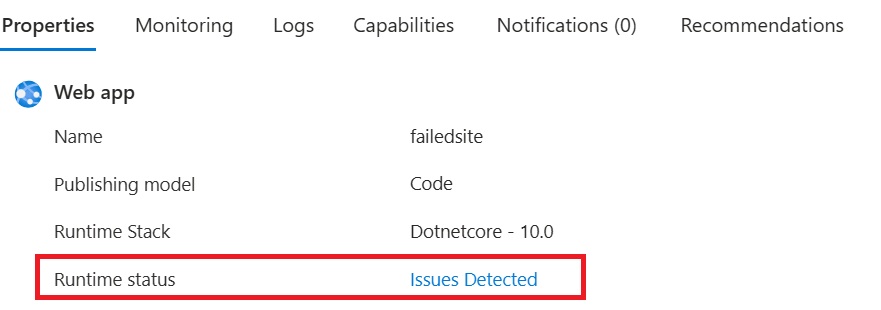
Selecting Issues Detected opens a detailed view where you can see the current status of the site, the last known error, and additional troubleshooting details. If your app is scaled out across multiple instances, Site Status shows this information for each instance hosting your app.
This makes it easier to answer questions such as:
- Is my website still starting?
- Did my website start successfully?
- Is the site stopped or blocked?
- Is the app recycling to apply changes?
- What was the last known runtime error?
- Is this likely a transient issue, or does the error point to a configuration problem?
Site Status values
Site Status reports one of the following platform-defined runtime states for your website:
| Status | Description |
|---|---|
| Starting | The site is initializing the container and all necessary components. |
| Started | The site successfully initialized all necessary components and is running. |
| Stopping | The container and site components are being torn down. |
| Stopped | The site is no longer running and will not receive requests. |
| Updating | The site is recycling, either overlapped or non-overlapped, to apply the provided changes. |
| Blocked | The site attempted to start multiple times and is temporarily blocked from another attempt to reduce instance load. |
| Unknown | A platform-side issue is preventing status assessment. |
These statuses provide a quick summary of the current or last known runtime state of your website.
View detailed issue information
When Site Status detects an issue, you can select Issues Detected to view more detailed runtime information.
The details page shows information such as:
| Field | What it tells you |
|---|---|
| Status | The current runtime state of the website. |
| Last error | A short error category or failure type. |
| Last error info | Additional troubleshooting details about the issue. |
| Last error occurrence | When the error was last observed. |
| Actions | Available repair actions. |
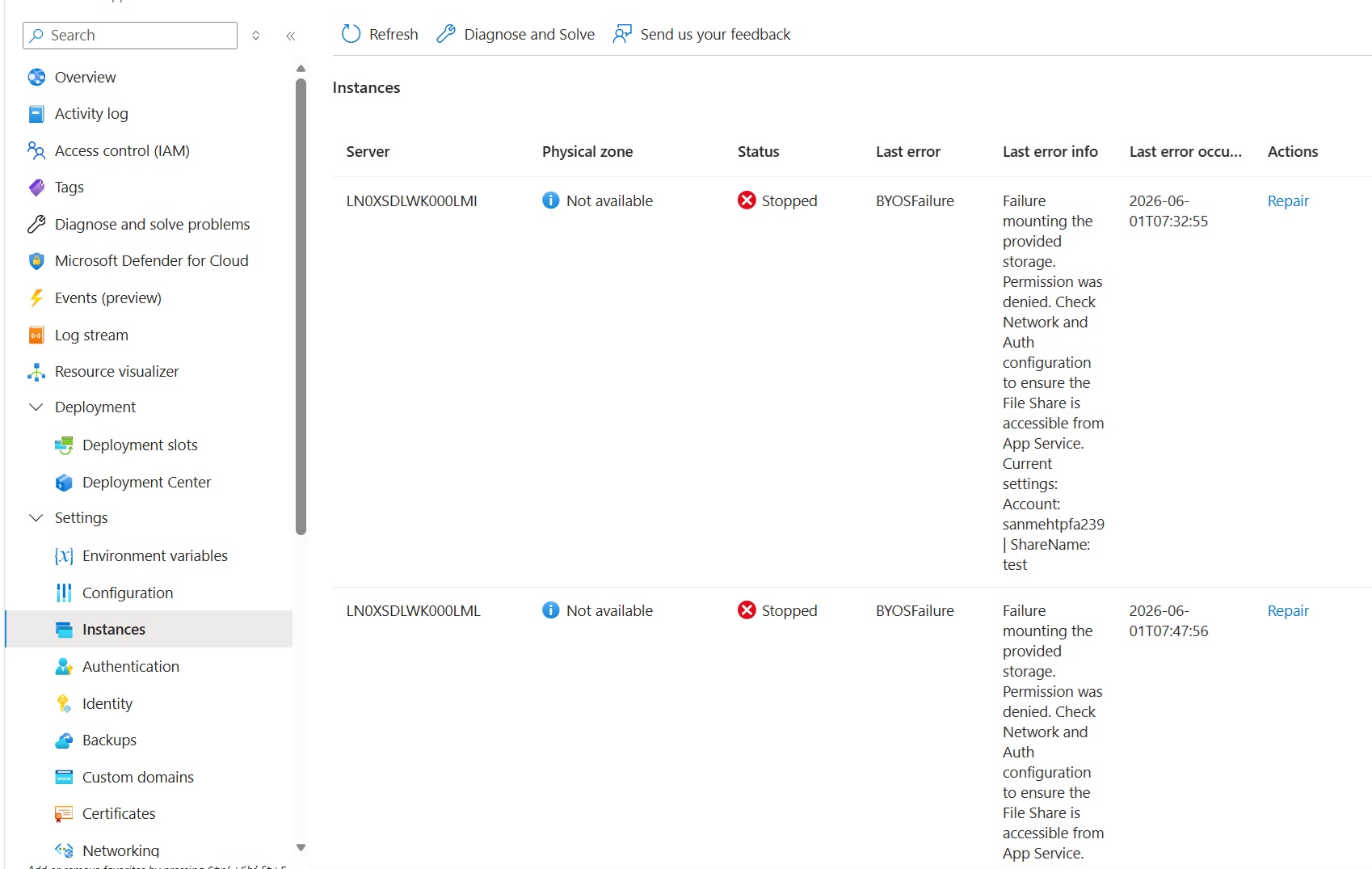
For example, the screenshot above show a site that failed because the configured storage could not be mounted. The message points you toward the likely root cause. In this case, the issue is probably not with the site process itself. Restarting the app or replacing the instance may not resolve the problem. You would likely need to review the storage account, file share, firewall, networking, private endpoint, or authentication configuration.
Repair actions
From the issue details view, you can select Repair to take an action for the affected instance.
Available repair actions include:
| Action | Description |
|---|---|
| Restart | Restarts the site on the selected instance. |
| Replace instance | Moves the site away from the current instance and replaces it with another instance. |
These actions can be useful when your website has run into a transient runtime issue, or when the underlying instance is in a bad state.
However, repair actions are not a substitute for fixing configuration issues. For example, if the site cannot access a configured storage account because of network or authentication settings, restarting or replacing the instance is unlikely to fix the issue. The underlying configuration must be corrected first.
Site Status vs. Health Check
Site Status and Health Check are both useful for understanding and improving the reliability of App Service for Linux websites, but they serve different purposes.
Site Status helps you understand the current runtime state of your website. It provides platform-defined status values and detailed error information to help you troubleshoot startup, runtime, and configuration-related issues.
Health Check helps determine whether an instance should continue receiving traffic. It pings a customer-configured endpoint and uses the HTTP response to identify unhealthy instances, redirect traffic, and replace instances when needed.
| Health Check | Site Status |
|---|---|
| Pings a customer-configured endpoint. | Uses platform-side runtime checks. |
| Reports the HTTP status returned by your configured endpoint. | Reports a platform-defined runtime status for the site. |
| Helps determine whether an instance should receive traffic. | Helps explain what is happening with the website at runtime. |
| Requires a health check path to be configured. | Does not require a customer-configured health endpoint. |
Summary
Site Status gives you a clearer view into the runtime state of your App Service for Linux website. By surfacing platform-defined site status values and detailed runtime information, it helps you understand what is happening with your application as it starts, runs, updates, or stops.
We are continuously improving App Service for Linux to provide better visibility, more actionable information, and a smoother experience for running your applications in Azure.
